
User's Guide




34
II
. Extra Setup
• By default, the speaker system setting is set to 9.1 channels.
Perform this setting if you want to change the channel setup to match the speaker system you are using or to conduct the power amplifier
assignment procedure. If you do not want to perform this “Extra Setup” procedure, proceed to the “Preliminary measurements” on page 35.
1−1.Auto Setup
at ear height at
Please place microphone
main listening position.
Cancel
Start
Channel:9.1CH
Extra Setup
1
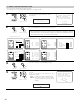
Select “Extra Setup”.
CH SEL
ENTER
(Main unit) (Remote control unit)
Extra Setup
*Auto Setup
2
Press the Cursor left button.
Switch to the Extra Setup screen.
CH SEL
ENTER
(Main unit) (Remote control unit)
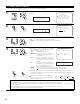
1−1.Extra Setup
Channel Setup
Power Amp Assign
Exit
Channel Setup
*Extra Setup
3
Choose the setting you want to change then press the ENTER button to switch to the setting
screen.
• For instructions on making the “Channel Setup” settings, see pages 97~100.
• For instructions on making the “Power Amp Assign” settings, see pages 101~105.
The speakers measured with this Auto Setup procedure are based on the setting of these
“Channel Setup” and “Power Amp Assign” functions.
(Main unit)
CH SEL
ENTER
(Remote control unit)
CH SEL
ENTER
(Main unit)
(Remote control unit)
4
CH SEL
ENTER
(Main unit) (Remote control unit)
Once the settings are completed, press the ENTER button at the each setting screen.
The Extra Setup Menu re-appears.
5
Select “Exit” and press the ENTER button to return to the Auto Setup screen.