
User's Guide





170
RDS search
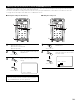
Use this function to automatically tune to FM stations that provide RDS service.
1
Set the input source to “TUNER”.
New tuning system for
your convenience!
1 Push
−RDS station
−Program category
−Traffic info.
−Radio Text
2 Tune by preset
CH
B5
FM
105.50M㎐
[ R D S ]
Up
Down
RDS
RDS
PTY
TP
RT
RC-995
3
1
2
2
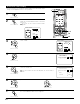
Press the RDS button until “RDS
SEARCH” appears on the display.
(Remote control unit)
The Main unit’s display switches as follows each time the
RDS buttons are pressed.
RDS SEARCH PTY SEARCH
RT ON TP SEARCH
Display
This is the screen when operated.
3
Press the CHANNEL + (UP) or –
(DOWN) button to automatically begin
the RDS search operation.
If no RDS stations is found with above
operation, all the reception band are
searched.
(Remote control unit)
4
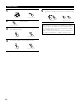
When a broadcast station is found, that station’s name
appears on the display.
5
To continue searching, repeat step 3.
If no other RDS station is found when all the frequencies are
searched, “NO RDS” is displayed.
This is the screen when operated.
(Remote control unit)
New tuning system for
your convenience!
1 Push
−RDS station
−Program category
−Traffic info.
−Radio Text
2 Tune by preset
[ R D S ]
Up
Down
RDS
RDS
PTY
TP
RT
Search