
User's Guide





168
Recalling preset stations
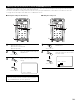
• Recalling preset stations from the Remote control unit.
•Preset stations can be chosen directry preset channel and channel range button. (see page 115)
1
Select the preset memory block.
2
Watching the display, press the
CHANNEL + (UP) or – (DOWN) button
to select the desired preset channel.
RC-995
2
1
(Remote control unit)
(Remote control unit)
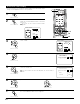
• Recalling preset stations from the Main unit’s panel.
1
Press the TUNING PRESET button.
2
Turn the FUNCTION knob and select
the desired preset channel.
2 1
(Main unit)
(Main unit)
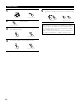
Checking the preset stations
•The preset (broadcast) stations can be checked on the on screen display.
1
Press the ON SCREEN button on the Remote control unit
repeatedly until the “Tuner Preset Stations” screen appears
on the OSD.
Tuner Preset Stations
A1
FM
87.50M㎐
A3
FM
98.10M㎐
A4
FM
107.90M㎐
A5
FM
90.10M㎐
A6
FM
90.10M㎐
A7
FM
90.10M㎐
A8
FM
90.10M㎐
OSD−8
A2
FM
89.10M㎐
1
(Remote control unit)