
User's Guide





164
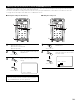
Zone2 tone control setting
• This function allows you to adjust the bass and treble of the Zone2 audio output
during surround playback in Zone2 to suit your tastes.
2
Press the SURROUND PARAMETER button.
Display the Surround Parameter Menu on the Zone2
monitor out.
The screen for the selected surround mode
appears.
1
3~6
2,8
7,8
1
Select the ZONE2 mode using the AMP/Z2 button.
(Remote control unit)
ROOM SIZE
medium
EFFECT 10
TONE
SB CH OUT
:
Yes
ROCK ARENA
ON
OFF
Default
3
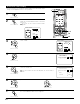
Select “TONE”.
CH SEL
ENTER
(Remote control unit)
ROOM SIZE
medium
EFFECT 10
TONE
SB CH OUT
:
Yes
ROCK ARENA
ON
OFF
Default
4
Display the Tone Control screen.
CH SEL
ENTER
(Remote control unit)
5
Display the Tone Control screen.
Select Tone Defeat OFF.
If you do not want to the tone to be adjusted, set “Tone Defeat” to
“ON”.
CH SEL
ENTER
(Remote control unit)
Tone Control
Tone Defeat :
Bass +6
dB
Treble +4
dB
ON
OFF
6
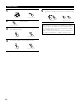
q Select Bass or Treble.
CH SEL
ENTER
(Remote control unit)
w Select the level.
CH SEL
ENTER
(Remote control unit)
(Remote control unit)
7
Enter the setting.
The Surround Parameter Menu screen re-appears.
CH SEL
ENTER
(Remote control unit)