
User's Guide




149
NOTES:
• The surround speaker setting can also be changed with the SPEAKER button on the Main unit or Remote control unit.
• When “Default” is selected and the Cursor left button is pressed, “CINEMA EQ.” and “D.COMP.” are automatically turned off, “ROOM
SIZE” is set to “medium”, “EFFECT LEVEL” to “10”, “DELAY TIME” to “30ms” and “LFE” to “0dB”.
• The “ROOM SIZE” expresses the expansion effect for the different surround modes in terms of the size of the sound field, not the actual
size of the listening room.
• When playing PCM digital signals or analog signals in the DOLBY PRO LOGIC II, DOLBY PRO LOGIC IIx, DTS NEO:6 modes and the
input signal switches to a digital signal encoded in Dolby Digital, the Dolby surround mode switches automatically. When the input signal
switches to a DTS signal, the mode automatically switches to DTS surround.
Tone control setting
• Use the tone control setting to adjust the bass and treble as desired.
• The tone control function will not work in the PURE DIRECT, DIRECT or Home THX Cinema mode.
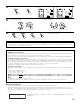
1
Press the SURROUND PARAMETER button.
Display the Surround Parameter Menu.
The screen selected surround mode appears.
2~5
1,7
6,7
ROOM SIZE
medium
EFFECT 10
TONE
SB CH OUT
:
Yes
ROCK ARENA
ON
OFF
Default
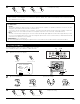
2
Select “TONE”.
CH SEL
ENTER
ROOM SIZE
medium
EFFECT 10
TONE
SB CH OUT
:
Yes
ROCK ARENA
ON
OFF
Default
3
Switch to Tone Control screen.
CH SEL
ENTER
Total Control
Tone Defeat :
OFF
ON
ROOM: medium
*Surr Parameter
TONE
*Surr Parameter
Tone Def.: ON
*Tone Control
[1]
Adjusting the tone using the Remote control unit
(Remote control unit)
(Remote control unit)
(Remote control unit)
4
Select Tone Defeat OFF.
CH SEL
ENTER
Tone Control
Tone Defeat :
Bass +6
dB
Treble +4
dB
Indivldual Control
ON
OFF
(Remote control unit)
SurroundBack
Bass +6
dB
Treble +4
dB
Subwoofer
Bass +6
dB
Front
Bass +6
dB
Treble +4
dB
Center
Bass +6
dB
Treble +4
dB
Surround
A Bass +6
dB
Treble +4
dB
Surround
B Bass +6
dB
Treble +4
dB
Tone Def.: OFF
*Tone Control