
User's Guide




144
DTS NEO:6 mode
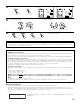
1
Select the DTS NEO:6 mode.
2
Play a program source.
1 3,66
4,5
1
1
3,6
4,5
6
The DTS NEO:6 Cinema or
Music mode can be chosen
directly by pressing the
CINEMA or MUSIC button
on the Remote control unit
during playback in the DTS
NEO:6 mode.
• Surround playback can be performed for the analog input and digital input 2-channel signals.
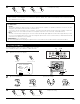
3
Display the Surround Parameter Menu.
4
Select the play mode.
MODE: Music
*Surr Parameter
MODE: Cinema
*Surr Parameter
Display
• The mode switches as shown below each time the
STANDARD button is pressed.
DTS NEO:6DOLBY PL IIx
CNTR.IMAGE
0.3
D.COMP
TONE
SB CH OUT
:
Yes
DTS NEO:6
MODE
ON
OFF
OFF
Default
MUSIC
(Main unit) (Remote control unit) (Remote control unit)
EQ
D.COMP
TONE
SB CH OUT
:
Yes
DTS NEO:6
MODE
ON
OFF
OFF
OFF
Default
CINEMA
CINEMA
(Main unit) (Remote control unit)
CH SEL
ENTER
(Main unit) (Remote control unit)
5
q Select the various surround parameters.
CH SEL
ENTER
(Main unit) (Remote control unit)
w Adjust the parameters setting.
CH SEL
ENTER
(Main unit) (Remote control unit)
• The DTS NEO:6 indicator lights.
Light