
User's Guide




142
Dolby Pro Logic
II
x (Pro Logic
II
) mode
1
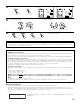
Select the Dolby Pro Logic IIx mode using the STANDARD
button.
2
Play a program source with the mark.
• For operating instructions, refer to the manuals of the respective components.
1 3,66
4,5
1
1
3,6
4,5
6
The Dolby Surround Pro
Logic IIx Cinema, Music or
Game mode can be chosen
directly by pressing the
CINEMA, MUSIC or GAME
button on the Remote
control unit during playback
in the Dolby Pro Logic IIx
mode.
To play in the PL IIx mode, set “Sp.Back” at the Speaker Configuration setting to “1Spkr” or “2Spkr”.
To play in the PL IIx mode, set “Surround Back” at the Power Amp Assign setting.
(Main unit) (Remote control unit) (Remote control unit)
• The Dolby Pro Logic indicator lights.
Light
MODE
PL
IIx
EQ
D.COMP
TONE
SB CH OUT
:
Yes
DOLBY PL
IIx
ON
OFF
OFF
OFF
Default
CINEMA
CINEMA
3
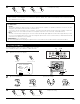
Display the Surround Parameter Menu.
MODE: PL x C
*Surr Parameter
(Main unit) (Remote control unit)
(Pro Logic II Cinema mode)
(Pro Logic II Music mode) (Pro Logic II Game mode)
(Dolby Pro Logic mode)
MODE: PL G
*Surr Parameter
MODE: PL C
*Surr Parameter
MODE: PL M
*Surr Parameter
*Surr Parameter
MODE: DOLBY PL
Display
• When the “SB CH OUT” parameter is set to “ON”.(Set “SP.Back” at the System Setup to “1spkr” or “2spkr”).
MODE: PL x C
*Surr Parameter
MODE: PL x M
*Surr Parameter
(Pro Logic IIx Cinema mode) (Pro Logic IIx Music mode)
MODE: PL x G
*Surr Parameter
(Pro Logic IIx Game mode)
Display
• When the “SB CH OUT” parameter is set to “OFF”.(Set “SP.Back” at the System Setup to “None”).
4
Select the play mode.
NOTE:
• The PL IIx mode is set when the “SB CH OUT” surround parameter is set to “ON”,
and the PL II mode is set when this parameter is set to “OFF”.
CH SEL
ENTER
(Main unit) (Remote control unit)
• The mode switches as shown below each time the
STANDARD button is pressed.
DTS NEO:6DOLBY PL IIx