
User's Guide






138
7
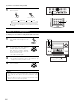
Press the ENTER or SURROUND PARAMETER button
to complete the setting.
6
q Select the parameter. w Select the setting.
CH SEL
ENTER
(Main unit) (Remote control unit)
or
(Main unit)
CH SEL
ENTER
or
(Remote control unit)
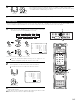
Surround parameters q
DECODER:
Select the decoder to be used when playing 2-channel sources in the Home THX Cinema mode.
PL IIx C ...The signals are decoded in the Dolby Pro Logic IIx Cinema mode before undergoing THX processing.
PL II C .....The signals are decoded in the Dolby Pro Logic II Cinema mode before undergoing THX processing.
PL............The signals are decoded in the Dolby Pro Logic mode before undergoing THX processing.
NEO:6 C ..The signals are decoded in the NEO:6 Cinema mode before undergoing THX processing.
MODE/SB CH OUT:
Select the surround back channel playback method or mode.
ON ..........................This is the recommended play mode for using the surround back channel when DTS NEO:6 is selected.
OFF.........................This is the recommended play mode when Dolby Pro Logic II is selected. The surround back channel is not played.
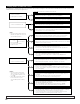
Checking the input signal
The input signal can be checked by pressing the Remote control unit’s ON
SCREEN button. (See page 131)
SIGNAL: Displays the type of signal (DTS, DOLBY DIGITAL, PCM, etc.).
fs: Displays the input signal’s sampling frequency.
FORMAT: Displays the input signal’s number of channels.
“Number of front channels/Number of surround channels/LFE on/off”
“SURROUND” is displayed for 2-channel signal sources recorded in Dolby Surround.
OFFSET: Displays the dialog normalization offset value. (See page 141)
FLAG: Displays the special identification signal recorded in the input signal. (See page 139)
“MATRIX” is displayed when matrix processing is conducted on the surround back
channel, “DISCRETE” is displayed when discrete processing is conducted.
Not displayed when no identification signal is recorded.
In addition, screen information is displayed in the following order when the ON SCREEN button is
pressed repeatedly:
OSD-1 Audio input signal
OSD-2 Video information
OSD-3 Input/output
OSD-4 Auto surround mode
OSD-5 USER MODE 1
OSD-6 USER MODE 2
OSD-7 USER MODE 3
OSD-8~14 Tuner preset stations
NOTE:
OSD-4: This is displayed when the auto surround mode is set to “ON” (see page 81) and the input mode is set to “Auto”.
It is not displayed when the input mode is set to “Analog” or “EXT. IN-1,-2”.
OSD-2: This is not displayed on ZONE2 MONITOR OUT when ZONE2 ON SCREEN button is pressed.
RoomEQ:OFF
SIGNAL:DOLBY DIGITAL
fs :48kHz
FORMAT:3/2/.1
OFFSET:−4dB
OSD−1
:Dolby Digital EX
Mode
RoomEQ:OFF
SIGNAL:DTS
fs :48kHz
FORMAT:3/3/.1
FLAG :DISCRETE
OSD−1
:DTS ES DSCRT6.1
Mode
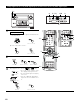
(Remote control unit)
CH SEL
ENTER
(Main unit) (Remote control unit)