
User's Guide






112
6
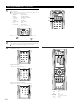
Select “Exit” and press the ENTER button to finalize the setting and exit the Option Setup mode.
When the setup lock function is activated, the settings listed below cannot be changed, and
“Setup Locked” is displayed when related buttons are operated.
• System setup settings
• Surround parameter settings
•Tone control settings
• Channel level settings (including test tones)
• RoomEQ
To unlock, press the System Setup button again and
display the Setup Lock screen, then select “OFF”
and press the ENTER button.
(Main unit)
CH SEL
ENTER
(Remote control unit)
CH SEL
ENTER
(Main unit)
(Remote control unit)
1.Channel Setup
2.Power Amp Assign
3.Volume Control
4.Trigger Out
5.AC Outlet Assign
6.Setup Memory/Lock
Exit
7.Option Setup
Exit
*Option Setup
System setup is complete. Once these settings are made, there is no need to change them unless different AV components are
connected or the speakers are repositioned.
After completing system setup
This button can be pressed at any time during the system setup process to complete the process.
1
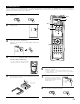
Press the SYSTEM SETUP button at the System Setup Menu, or select “Exit” and press the
ENTER button.
The changed settings are entered and the on-screen display turns off.
(Main unit) (Remote control unit)
(Main unit)
CH SEL
ENTER
(Remote control unit)
CH SEL
ENTER
(Main unit)
(Remote control unit)
1.Auto Setup/Room EQ
2.Speaker Setup
3.Audio Input Setup
4.Video Setup
5.Advanced Playback
6.Zone Setup
7.Option Setup
Exit
System Setup Menu
Exit
*System Setup
2 On-screen display for component video outputs
• When viewing component video signals via the AVR-5805, the on-screen display is only displayed on the monitor when the “System Setup”
and “Surround Parameter” operations are performed and when the Remote control unit’s ON SCREEN button is operated.
• When only component video signals are input to the AVR-5805 or when “Component” is selected at the “Video Convert Mode settings”, the
characters of the on-screen display are not displayed over the picture.