
User Guide




Table Of Contents
- SAFETY PRECAUTIONS
- NOTE ON USE
- SAFETY INSTRUCTIONS
- INTRODUCTION
- TABLE OF CONTENTS
- ACCESSORIES
- 1. BEFORE USING
- 2. CAUTIONS ON INSTALLATION
- 3. CAUTIONS ON HANDLING
- 4. FEATURES
- 5. CONNECTIONS
- 6. PART NAMES AND FUNCTIONS
- 7. SETTING UP THE SYSTEM
- 8. REMOTE CONTROL UNIT
- 9. OPERATION
- 10. SURROUND
- 11. DSP SURROUND SIMULATION
- 12. LISTENING TO THE RADIO
- 13. LAST FUNCTION MEMORY
- 14. INITIALIZATION OF THE MICROPROCESSOR
- 15. TROUBLESHOOTING
- 16. ADDITIONAL INFORMATION
- 17. SPECIFICATIONS
9
YCRCB
VIDEO OUT
Y
CR CB
COMPONENT
VIDEO IN
COMPONENT
B
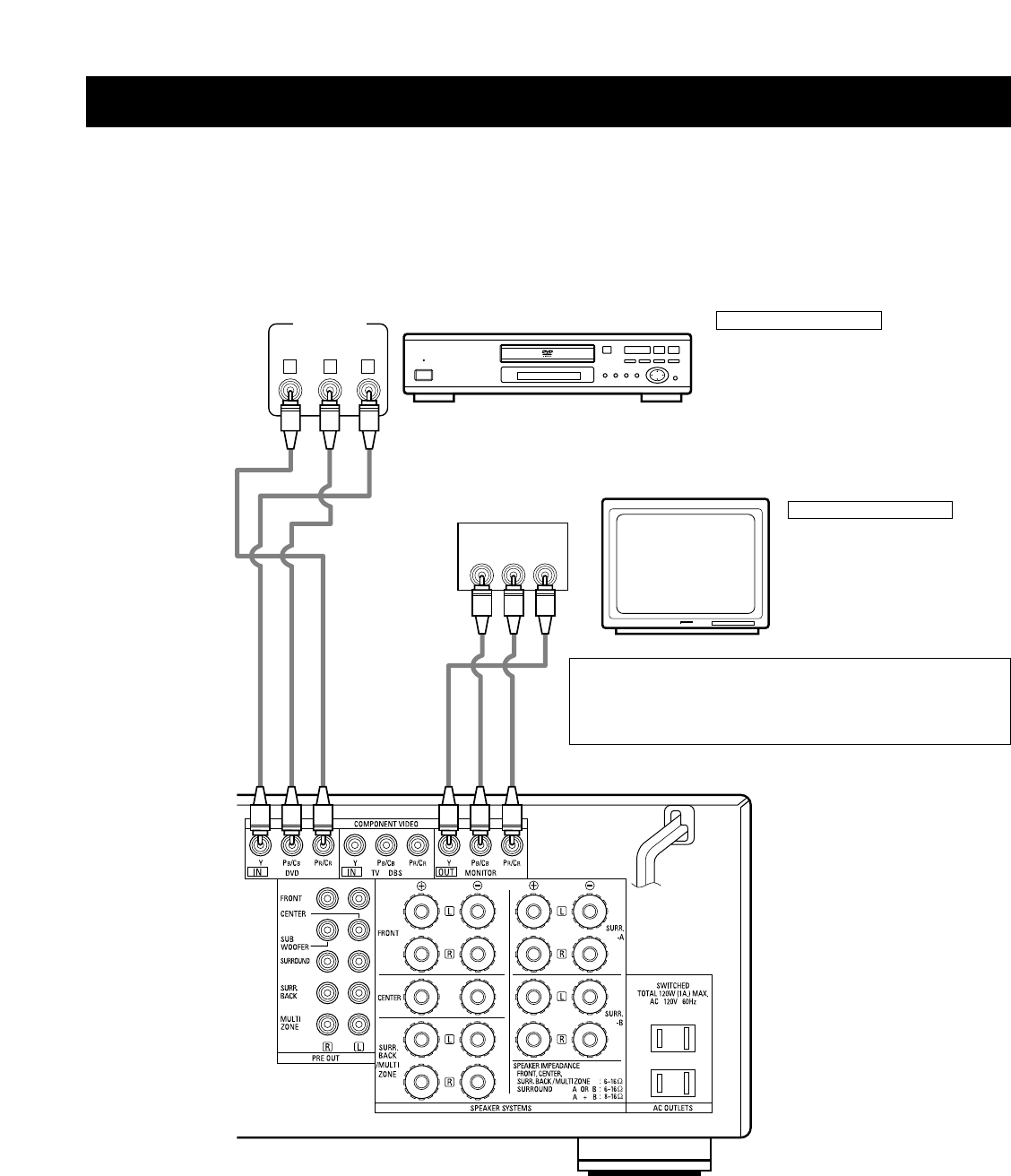
Connecting a Video Component Equipped with Color Difference (Component - Y, P
R
/C
R
, P
B
/C
B
) Video
Jacks (DVD Player)
• When making connections, also refer to the operating instructions of the other components.
• The signals input to the color difference (component) video jacks are not output from the VIDEO output jack (yellow) or the S-Video output jack.
In addition, the video signals input to the VIDEO input (yellow) and S-Video input jacks are not output to the color difference (component) video
jacks.
• The AVR-3802’s on-screen display signals are not output from the color difference (component) video output jacks (MONITOR OUT).
• Some video sources with component video outputs are labeled Y, CB, CR, or Y, Pb, Pr, or Y, R-Y, B-Y. These terms all refer to component video
color difference output.
DVD player
Connecting a DVD player
DVD IN jacks
• Connect the DVD player’s color difference
(component) video output jacks (COMPONENT
VIDEO OUTPUT) to the COMPONENT DVD IN jack
using 75 Ω/ohms coaxial video pin-plug cords.
• In the same way, another video source with
component video outputs such as a TV/DBS tuner,
etc., can be connected to the TV/DBS color
difference (component) video jacks.
Monitor TV
Connecting a monitor TV
MONITOR OUT jack
• Connect the TV’s color difference
(component) video input jacks
(COMPONENT VIDEO INPUT) to the
COMPONENT MONITOR OUT jack
using 75 Ω/ohms coaxial video pin-
plug cords.
• The color difference input jacks may be indicated differently on
some TVs, monitors or video components (“CR, CB and Y”, “R-Y,
B-Y and Y”, “Pr, Pb and Y”, etc.). For details, carefully read the
operating instructions included with the TV or other component.