
User Guide
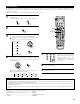
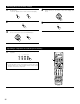


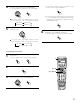


Table Of Contents
- SAFETY PRECAUTIONS
- NOTE ON USE
- SAFETY INSTRUCTIONS
- INTRODUCTION
- TABLE OF CONTENTS
- ACCESSORIES
- 1. BEFORE USING
- 2. CAUTIONS ON INSTALLATION
- 3. CAUTIONS ON HANDLING
- 4. FEATURES
- 5. CONNECTIONS
- 6. PART NAMES AND FUNCTIONS
- 7. SETTING UP THE SYSTEM
- 8. REMOTE CONTROL UNIT
- 9. OPERATION
- 10. SURROUND
- 11. DSP SURROUND SIMULATION
- 12. LISTENING TO THE RADIO
- 13. LAST FUNCTION MEMORY
- 14. INITIALIZATION OF THE MICROPROCESSOR
- 15. TROUBLESHOOTING
- 16. ADDITIONAL INFORMATION
- 17. SPECIFICATIONS
32
Checking the preset memory settings
1
2
3
ON /
SOURCE
OFF
ENTER
SHIFT
BAND MODE
TUNING
TUNING
ENTER
SHIFT
Press the power ON/SOURCE button and the OFF button at
the same time.
•“SET UP” appears on the remote control unit’s display.
Press the ENTER button.
Use the D and H cursor buttons to display “CODE NO” on the
remote control unit, then press the ENTER button.
4
BAND MODE
TUNING
TUNING
Press the D and H cursor buttons to display the registered
preset memory on the remote control unit’s display and
check.
5
ENTER
SHIFT
Press the ENTER button to terminate.
Operating a component stored in the preset memory
1
Press the mode selector button for the component you want
to operate.
1
2
3
456
789
+10
0
TV/
VCR
OFF
TV
CD
CDR/MD/ TAPE RECEIVER
VCR DBS/CABLE
SKIP
SKIP
ENTER
MEMORY
VOLUME
CHANNEL
+
-
+
-
VDP DVD
POWER
REMOTE CONTROL UNIT
RC-883
ON /
SOURCE
TUNER
VDP
VCR-1 VCR-2/ V.AUX
DVD
TV/DBS
CDR/TAPE
PHONO
CD
SURROUND
INPUT
OUTPUT
TEST
TONE
SPEAKER
6.1 / 7.1
SURROUND
5CH / 7CH
ANALOG
EXT.INMODE
CALL 2
BACKLIGHT
CALL 1
STEREO
STEREO
DOLBY/DTS
SURROUND
DSP
SIMU.
DISPLAY
SYSTEM CALL
DIRECT
RETURN
SETUP
MENU
SHIFT
SURR.
PARA.
OSD
A/B
MUTING
BAND MODE
TUNING
TUNING
1
NOTE:
• For the DVD player remote control buttons, function names may
differ depending on the make. Compare with the remote control
operation of the various components.
TV
CD
CDR/MD/ TAPE RECEIVER
VCR DBS/CABLE VDP DVD