
User Guide





Table Of Contents
- SAFETY PRECAUTIONS
- NOTE ON USE
- SAFETY INSTRUCTIONS
- INTRODUCTION
- TABLE OF CONTENTS
- ACCESSORIES
- 1. BEFORE USING
- 2. CAUTIONS ON INSTALLATION
- 3. CAUTIONS ON HANDLING
- 4. FEATURES
- 5. CONNECTIONS
- 6. PART NAMES AND FUNCTIONS
- 7. SETTING UP THE SYSTEM
- 8. REMOTE CONTROL UNIT
- 9. OPERATION
- 10. SURROUND
- 11. DSP SURROUND SIMULATION
- 12. LISTENING TO THE RADIO
- 13. LAST FUNCTION MEMORY
- 14. INITIALIZATION OF THE MICROPROCESSOR
- 15. TROUBLESHOOTING
- 16. ADDITIONAL INFORMATION
- 17. SPECIFICATIONS
22
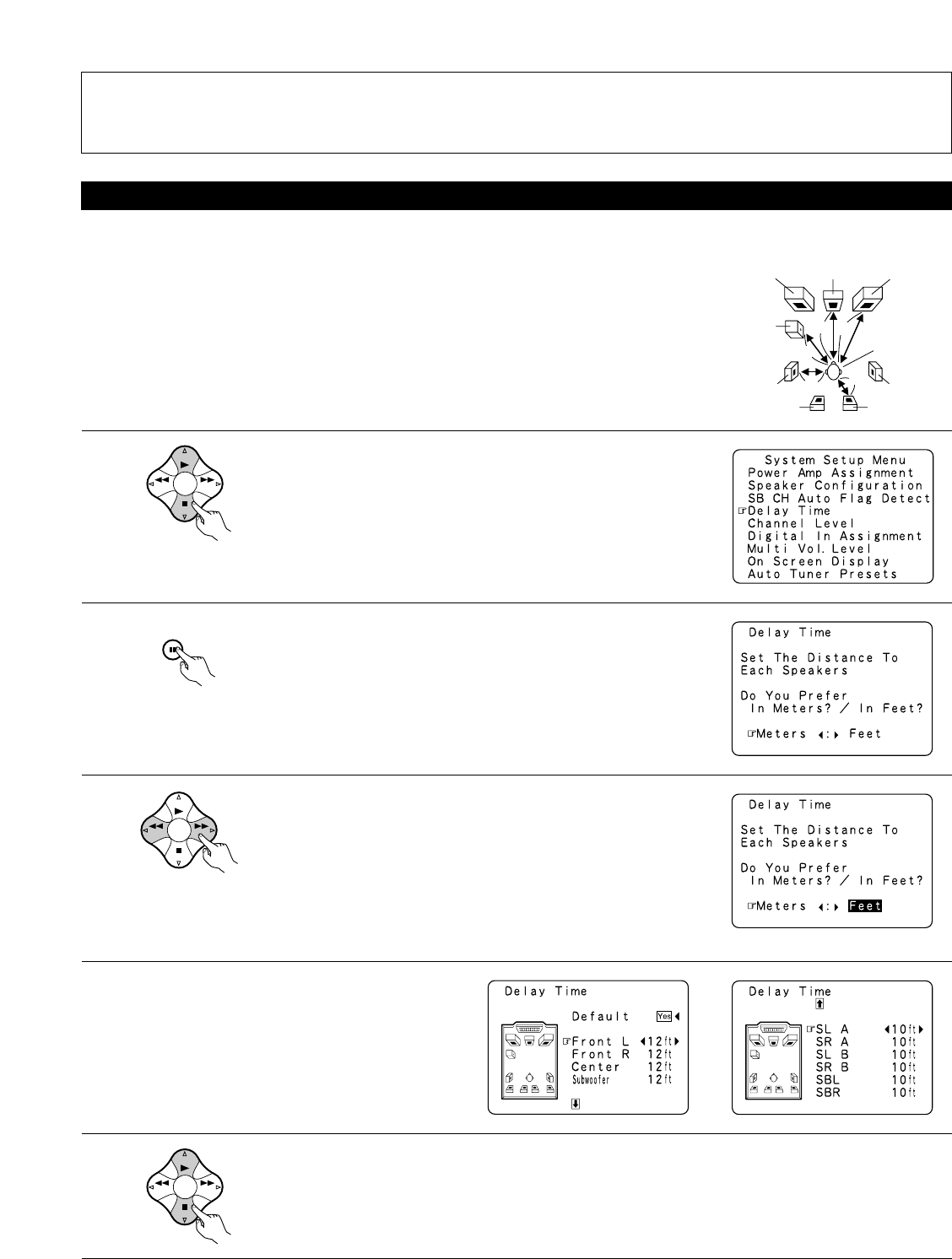
Setting the delay time
1
BAND MODE
TUNING
TUNING
At the System Setup Menu select “Delay Time”.
• Input the distance between the listening position and the different speakers to set the delay time for the surround mode.
• The delay time can be set separately for surround speakers A and B.
Preparations:
Measure the distances between the listening position and the speakers (L1 to L5 on the diagram at
the right).
L1: Distance between center speaker and listening position
L2: Distance between front speakers and listening position
L3: Distance between surround speakers and listening position
L4: Distance between surround back speakers and listening position
L5: Distance between subwoofer and listening position
L1
L2
L5
L3
L4
Center FRFL
Subwoofer
SL
Listening position
SR
SBRSBL
2
3
4
5
ENTER
SHIFT
BAND MODE
TUNING
TUNING
BAND MODE
TUNING
TUNING
Switch to the Delay Time screen.
Select the desired unit, meters or feet.
Select (darken) the desired units, “Meters” or “Feet”.
Once “Meters” or “Feet” is selected in step 3, the
Delay Time screen appears automatically.
Select the speaker to be set.
Example: When “Feet” is selected
NOTES:
• The SB CH Auto Flag Detect setting screen is displayed when the surround back speaker(s) is/are set to “Large” or “Small” at the “Speaker
Configuration” screen.
• The surround back speaker(s) can also be turned on and off with the 6.1/7.1 SURROUND button on the main unit. (See page 52.)