
User Guide




Table Of Contents
- SAFETY PRECAUTIONS
- NOTE ON USE
- SAFETY INSTRUCTIONS
- INTRODUCTION
- TABLE OF CONTENTS
- ACCESSORIES
- 1. BEFORE USING
- 2. CAUTIONS ON INSTALLATION
- 3. CAUTIONS ON HANDLING
- 4. FEATURES
- 5. CONNECTIONS
- 6. PART NAMES AND FUNCTIONS
- 7. SETTING UP THE SYSTEM
- 8. REMOTE CONTROL UNIT
- 9. OPERATION
- 10. SURROUND
- 11. DSP SURROUND SIMULATION
- 12. LISTENING TO THE RADIO
- 13. LAST FUNCTION MEMORY
- 14. INITIALIZATION OF THE MICROPROCESSOR
- 15. TROUBLESHOOTING
- 16. ADDITIONAL INFORMATION
- 17. SPECIFICATIONS
18
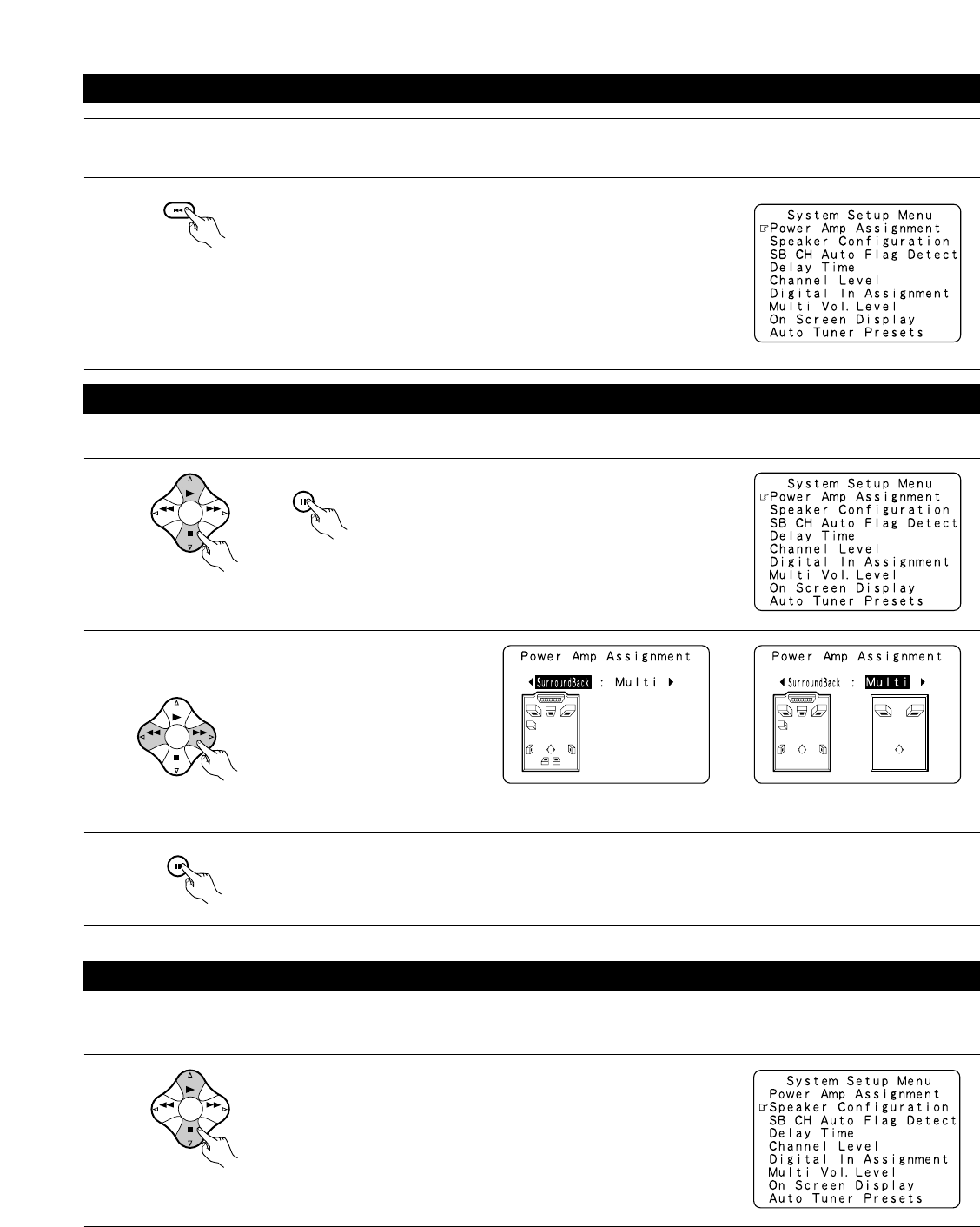
Before setting up the system
1
2
Check that all the connections are correct, then turn on the main unit’s power.
SETUP
Display the System Setup Menu.
Make this setting to switch the power amplifier for the surround back channel to Multi.
1
At the System Setup Menu, select “Power Amp
Assignment” and press the ENTER button
BAND MODE
TUNING
TUNING
3
Enter the setting.
The System Setup Menu reappears.
ENTER
SHIFT
2
Select “Surround Back” to use as the surround back
channel, “Multi” to use as multi zone out.
ENTER
SHIFT
BAND MODE
TUNING
TUNING
When “Surround Back” is selected When “Multi” is selected
Setting the power amplifier assignment
Setting the type of speakers
• The composition of the signals output from the different channels and the frequency response are adjusted automatically according to the
combination of speakers actually being used.
1
BAND MODE
TUNING
TUNING
At the System Setup Menu select “Speaker Configuration”.