
User Guide


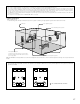


Table Of Contents
- SAFETY PRECAUTIONS
- NOTE ON USE
- SAFETY INSTRUCTIONS
- INTRODUCTION
- TABLE OF CONTENTS
- ACCESSORIES
- 1. BEFORE USING
- 2. CAUTIONS ON INSTALLATION
- 3. CAUTIONS ON HANDLING
- 4. FEATURES
- 5. CONNECTIONS
- 6. PART NAMES AND FUNCTIONS
- 7. SETTING UP THE SYSTEM
- 8. REMOTE CONTROL UNIT
- 9. OPERATION
- 10. SURROUND
- 11. DSP SURROUND SIMULATION
- 12. LISTENING TO THE RADIO
- 13. LAST FUNCTION MEMORY
- 14. INITIALIZATION OF THE MICROPROCESSOR
- 15. TROUBLESHOOTING
- 16. ADDITIONAL INFORMATION
- 17. SPECIFICATIONS
11
R
L
B
L
R
L
R
RL
Connecting the external input (EXT. IN) jacks
• These jacks are for inputting multi-channel audio signals from an outboard decoder, or a component with a different type of multi-channel
decoder, such as a Super Audio DVD player, or a multi-channel SACD player, or other future multi-channel sound format decoder.
• When making connections, also refer to the operating instructions of the other components.
Decoder with 8- or 6-channel analog
output
Front
Surround
Surround back
Subwoofer
Center
For instructions on playback using the external input (EXT. IN) jacks, see page 44.
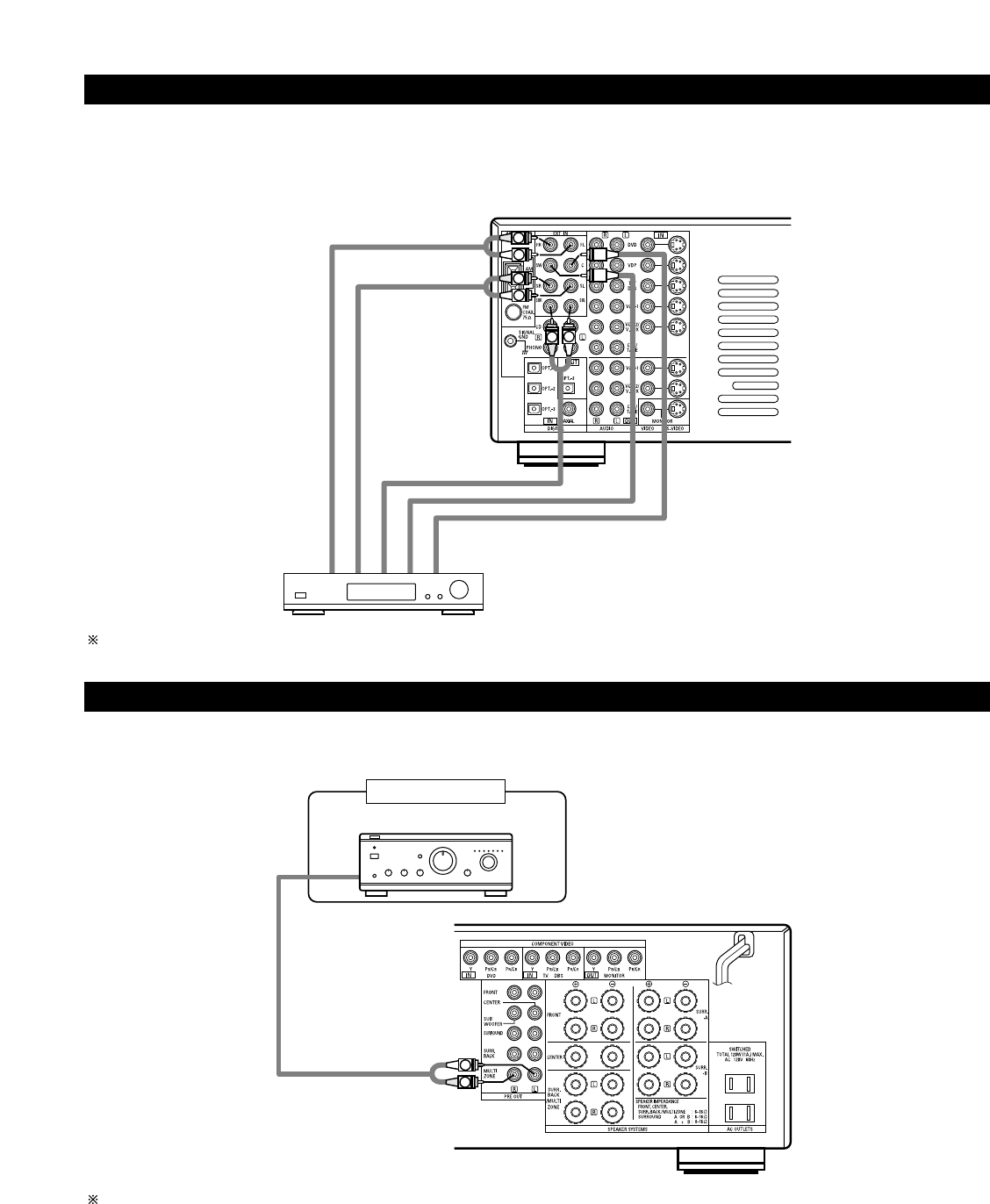
Connecting the MULTI ZONE jacks
• If another pre-main (integrated) amplifier or power amplifier is connected, the multi-source jacks can be used to play a different program source
in another room at the same time.
Another room
Integrated pre-main amplifier or power amplifier
For instructions on operations using the MULTI ZONE jacks, see page 46 ~ 48.