
Operating instructions


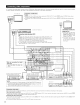


• When making connections, also refer to the operating instructions of the other components
CD ecorder or Tape deck 1 ou r_'UT IN['Ur
R L R L
[:oo
MD recorder or Tape deck 2 OUTPU I_'IT
R L R L
Connecting a tape deck]
Connections for recording:
Connect the aide deck's record ng input jacks (LINE IN or REC} to this
units tape ecording (O T} iacks using pin plug cords
Connections for playback:
Connect the tape deck's playback output jacks (LI#_E OUT or PB} to this
u/its tape playback {N) acks using pl/plug cords
Connecting the pre-out jacks
Use these jacks if you wish to connect ex e r/a] power amplifier{s} to
increase the power of the front, center, surround and surround back sound
channels, or fo_ connect on to powered oudspeakers
When usng only one surrou/d back speaker connect it to lef[ clan/el
I Connecting the AC OUTLETS_
AC OUTLETS
• SWITCHED
{tota] capacity 120 W (1 A)}
The power to these outlets is turned on and ofl in coniunct on with the POWER
switch on the mairl unt, and when tile power is switched between on and
standby from the remote control unit
No power is suppled lrom these outlets when this unit's power is at standby
Never connect equ pine/t whose total capacity is above 120 W (1 A}
NOTE:
Only use the AC OUTLETS ol audio equipment Never use her,/for/air dres,
TVs or other electr[ca( appliances
[ AC outlets (wail) ]
AC cord AC 120V, 6OHz
[ Connecting a CD player ]
Connect the CD player's analog
output jacks (ANALOG OUTPUT} to
this units CD iacks using pl/ plug
cords
@
Tumtable
{MM cartridge}
Groundwire
Extens on jacks for future use
[ Connecting a turntable ]
Connect the tumtabie's output cold to the AVR 5803's PHONO jacks, the
L (left} plug to the L iack, the R (right) plug to the ight jack
OPTICAL
MD recorder, DAT deck or other component
equ pped with digital nput,/output acks
NOTE:
This unt cannot be used with MC cartridges di ectly Use a separate
head amplifier or step up transformer
If humming or ot/e noise is generated when the gound w]e is
connected, disconnect the ground wire
Denon Link terminal
Use this term na] o connect a Denon DVD player for hg/ qua]ty dgtal
rPu tic_lar/l/el soun_
For detai s, refer to the DVD player's operat ng i/struet[or/s
_ -- _ DDOD | CD player or other compo/ent equpped
OUTPUT [Doo [o _==oJ withdigitaloutputiacks
Connecting the DIGITAL jacks ]
Use these for connections to audio equ pment with digital output
Refer to page 29 for nst uctions on set[ing this term r/a]
NOTES:
Use 7b _/ohl¥1s cable pill oo_ds or coaxa conr/ectiol/s
• Use optical cables for optical connections, e T1ov11gthe Gap belore cor//ecti/g
DIGITAL EXT. IN
Extended function for futue use
7