
Operating instructions




[] TROUBLESHOOTING
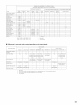
If a problem should arise,first check the following.
1. Are the connections correct ?
2. Have you operated the receiver according to the Operating Instructions ?
3. Are the speakers, turntable and other components operating property ?
If this unit is not operating properly, check the items listed in the table below. Should the problem persist, there may be a malfunction.
Disconnect the power immediately and contact your store of purchase
Symptom Cause Measures Page
DISPLAY not lit and sound not produced • Power cord not plugged in securely • Check the insertion of the power cord plug 7
when power switch set to on
• Speaker cords not securely connected • Connect securely 13, 14
• Input source selector button position is not • Switch to the proper position 39
appropriate
DISPLAY lit but sound not produced • Volume control set to minimum • Turn volume up to suitable level 40
• MUTING is on • Switch off MUTING 41
• No digital signal is being input • Propedy select a digital signal input source 29
• SpeakerAorBbuttonissetto"OFF" ,Set the button for the connected speaker 20
terminals to "ON"
• AVR-US03's video output jacks and monitor's • Check that the connections are correct 8 10
input jacks are not properly connected
Nothing is displayed on monitor • Monitor TV's input setting is wrong • Set the TV's input selector to the jacks to which 8 10
video signals are connected
• Connections of the various component's video • Unify to composite or S jack 8 10
signals are not unified
• DVD player's audio output setting is not set to bit • Make the DVD player's initial settings
stream
No dts sound is produced • DVD player is not dts-compatible • Use a dts-compatible player --
• AVR-SS03's input setting is set to analog • Set to AUTO or dts 39
Ultra2 Cinema/THX MusicMode cannot • Surround back speaker set to I • Connect two surround back speakers 18, 20, 27
be set
Copying from DVD to VCR is not • Mode video software contains copy prohibit • Copying is not possible
possible signals
• Subwoofer's power Esnot on • Turn on the power --
No sound is produced from subwoofer • Subwoofer's initial setting is set to "NO" • Set the setting to "YES" 20
• Subwoofer's output is not connected • Connect properly 14
• Surround mode is set to a mode other than • Set to Dolby Surround
No test to_es are produced Dolby Surrou_d
No sound is produced from surround • Surround mode is set to "STEREO" • Set to a mode other than "STEREO" --
speakers
Dolby Digital is not possible with LDs • Not connected to Dolby Digital jacks • Connect the LD player's Dolby Digital RF output to 8
the AVR-SS03's Dolby Digital RE input jacks
• BatteE es dead • Replace with new batteries 37
• Remote control unit too far from this unit • Move closer 37
• Obstacle between this unit and remote control • Remove obstacle 37
This unit does not operate propedy when unit
remote control unit is used
• Different button s being pressed • Press the proper button --
• (_ and O ends of battery inserted in reverse • Inserl batteries properly 37
69