
Operating instructions


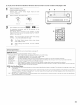





Surround playback can be conducted for the analog input and PCM
digital input 2_channel signals
Select the DTS NEO:6 mode.
DTS
SURROUND
(Main u/it) (Remotecontrol unit}
Play a program source
Display the Surround Parameter Menu.
®
(Remote contro] UTlit}
DTS NEO:6
CINEMA EQ.
COMP<_]_
LFE 4 OdBb
TONE 4
AFDM <[_
SB CH OUT
<NRML(ON) P
Yes4
m
O ..........
o ==2 == OO
1 4
AVAI_._
*q SURROUNOZl5 1>
[2E3
1 CEZI
4
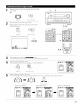
_.) Select the various surround parameters
{Remote contro] uTlit}
DTS NEO:6
CINEMA EQ.
_ COMP<_
LFE < 0dB_
TONE 4
AFDM <[_
SB CH OUT
4NRML(ON) I
Yes<
(2) Adjust the parameters setting.
wm
(Remote control unit}
• DTS NEO:6
CNTR IMAGE
40. 2_
D, COMP<[_]_
LFE < 0dB_
TONE 4
AFDM 4[oi__
SB CH OUT
<NRML (ON) I
Yes4
• Select CINEMA or MUSIC. (CINEMA is
optimum for movies, MUSIC is optimum
for music software}
It is possible to switch to the direct mode
using the CINEMA/MUSIC button on the
main unit's panel
CINEMA/
MUSIC
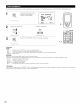
Enter the setting
%
(Remote contro UTlit}
(Main u/it)
NOTES:
• When "Default" is selected and the jog stick is moved to the left, "MODE" and "TONE" are automatically set to the default value.
• In addition, "CINEMA EQ." is set to OFF.
59