
Operating instructions


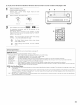


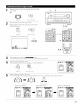



_ Select the various surround parameters (2_Adjust the parameters setting.
FUNCTION
(Main u@t) (Remote co/trol unt)
CONTROL
{Main u/it)
_m
(Remote ¢ol/t rol unit)
• DEFAULT setting
This operation cannot be performed by operating the buttons on the main unit.
Select "Default Yes _1", then parameters set to default setting.
©
41_|
{Remote contro] uTlit}
DOLBY PL I I MODE<[:_]_]I."
CINEMA EQ.
l1 COMP!_
LFE 4 0dBb
TONE <
AFDM 4[_>
SB CH OUT
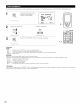
Stop pressing main unit's buttons once you have completed setting the surround parameters. After several seconds the normal display
reappears and the settings you have made are automatically set
NOTE:
• When making parameter settings, the display will return to the regular condition several seconds after the last button was pressed and the
setting will be completed
Surround parameters @_
Pro Logic II Mode:
The Cinema mode is for use with stereo television shows and all programs encoded Dolby Surround.
The Music mode is recommended as the standard mode for autosound music systems (no video), and is optional for A!V systems
The Pro Logic Emulation mode offers the same robust surround processing as original Pro Logic in case the source contents is not of optimum
quality
Select one of the modes ("Cinema", "Music" or "EML")
It is possible to switch to the direct mode using the CINEMA/MUSIC button on the main unit's panel.
Panorama Control:
This mode extends the front stereo image to include the surround speakers for an exciting "wraparound" effect with side wall imaging.
Select "OFF" or "ON".
Dimension Control:
This control gradually adjust the soundfield either towards the front or towards the rear
The control can be set in 7 steps from 0 to 6
Center Width Control:
This control adjust the center image so it may be heard only from the center speaker; only from the left/nght speakers as a phantom image;
or from all three front speakers to varying degrees.
The control can be set in 8 steps from 0 to 7
DTS NEO:6 MUSIC:
CENTER IMAGE (0O to 0.5: default 02)
The center image parameter for adjusting the expansion of the center channel in the DTS NEO:6 MUSIC mode has been added
58