
Operating instructions







[2] To play in the THX Surround EX/Home THX Cinema Surround mode for sources recorded in Dolby Digital or DTS
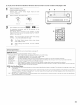
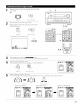
1
2
Select the program source
[Selecting a digital input source I
Perform step 1 under "Dolby Digital mode and DTS
Surround" (page 54).
Select the Home THX Cinema mode.
HOME
THX CINEMA _
{Main u/it{ (Remotecontrol unit}
2 3 3
O
Play a program source with the =l_l=lv[:_].L , _ mark.
For operating instructions, refer to the manuals of the
respective components
The channel status information during playback of Dolby
Digital and DTS sources can be checked using the "STATUS"
button on the main unit.
SURROUND
BACKC_,_The surround back LED lights green when playing
ou,P _o in the THX SURROUND EX mode.
m The Dolby Digital indicator lights when playing
Dolby Digital sources.
When playing DTS sources, the DTS indicator
lights.
2
^v/_up-geN_
SURROUND=IS _>
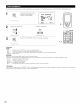
Surround parameters
For instructions on setting the surround parameters, see page 51
MODE/SB CH OUT:
Select the surround back channel playback method or mode.
THX Surround EX .Dolby Digital signals are played in the THX Surround EX mode.
Ultra2 Cinema ........ The signals are played in the THX Ultra2 Cinema mode.
Music Mode ........... The signals are played in the THX Music mode.
NON MTRX ............ The same signals as those of the surround channels are output from the surround back channels.
MTRX ON ............... The surround channel signals undergo digital matrix processing and are output from the surround back channels
SB OFF (OFF) ......... No signal is played from the surround back channels.
ES MTRX ................ When playing DTS signals, the surround back signals undergo digital matrix processing for playback.
ES DSCRT .............. When a signal identifying the source as a discrete 6.1=channel source is included in the DTS signals, the surround back
signals included in the source are played
AFDM (Auto Flag Detect Mode):
ON...This function only works with software on which a special identification signal is recorded This software is scheduled to go on sale
in the future
This is a function for automatically playing in the 6 l-channel mode using the surround back speakers if the software is recorded in
THX Surround EX or DTS=ES or in the normal 5.1_channel mode without using the surround back speakers when the software is not
recorded in THX Surround EX or DTS=ES.
OFF .Set the "OFF" mode to perform 6 1 channel playback with conventional 5.1=channel sources or sources on which the identification
signal described below is not recorded
53