
Operating instructions
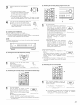


MAIN UNIT:
Turn the CONTROL knob to adjust the
level of the selected speaker
REMOTE CONTROL UNIT:
Move jog stick "ENTER" back and forth
to adjust the level of the selected speaker.
SW channel level can be turned off by
decreasing one step from -12 dB.
CONTROL
4
(Mail unit}
w_
(R®mote control unit}
REMOTE CONTROL UNIT:
Once the channel level adjustment is completed, press the
CURSOR/PAGE button again so that the display is no longer
highlighted, then press the CH SELECT button
(Rerr/ote ¢ol/t rol unit}
'_ When the surround back speaker setting is set to "lspkr" for
"Speaker Configuration", this is set to "SB".
• This function makes it possible to lower the volume of the front channels (FL, C and FR) or the rear channels {SL, SR, SBL and SBR) together.
Use it for example to adjust the balance of the sound from the different positions when playing multi_channel music sources.
MAIN UNIT: FUNCTION
Select "FADER" using the FUNCTION _ 0 _
knob after selecting "CH. VOL" with
the MODE SELECT button
(Mail unit}
REMOTE CONTROL UNIT:
Select "FADER"
\
(R®mote control unit}
2
MAIN UNIT: coNmo:
Turn the CONTROL knob clockwise to _ 0 _
adjust the volume of the surround side
collectively. Turn the CONTROL knob
counterclockwise to adjust the volume
of the front side collectively. (Mail unit}
REMOTE CONTROL UNIT:
Fw,lm
Move jog stick "ENTER" to the top side _
to adjust the volume of the surround side
.w.,
collectively.
Move jog stick "ENTER" to the bottom
side to adjust the volume of the front side (Remotecontrounit}
collectively.
The fader function does not affect the SW channel.
•_ The channel whose channel level is adjusted lowest can be faded
to -12 dB using the fader function.
•_ If the channel levels are adjusted separately after adjusting the
fader, the fader adjustment values are cleared, so adjust the fader
again
2
m
O ..........
i i
1 2
O
_Hal4
<3 SUrrOUND215
I .....II = 0ol
1
Fader FRONT4:_REAR
FL 0dB
C OdB
FR 0dE
SR 0dE
SBR 0dB
SBL 0dB
SL 0dB
Ths s only d splayed when setting the fader co/trol
49