
Operating instructions


I_]SURROUND
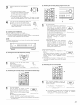
• Before playing with the surround function, be sure to use the test tones to adjust the playback level from the different speakers This adjustment
can be performed with the system setup (see page 24) or from the remote control unit, as described below
• Adjusting with the remote control unit using the test tones is only possible in the "Auto" mode and only effective in the DOLBY SURROUND
and HOME THX CINEMA modes The adjusted levels for the different modes are automatically stored in the memory
2
1
SETTING 315
E2E3
1,3
2,3
Press the TEST TONE button.
Teat tones are output from the different speakers. Press the
CURSOR/PAGE button to highlight the display, then use the
jog stick to adjust the channel level.
_m
After completing the adjustment, press the CURSOR/PAGE
button again so that the display is no longer highlighted, then
press the TEST TONE button to complete the operation.
• After adjusting using the test tones, make the desired settings for each surround mode to be played, then use the procedure described below
to adjust the levels of the various channels.
MAIN UNIT: MODE
Press the MODE SELECT button and select SELECT
"CH VOL"
The setting mode switches in the following
order each time the button is pressed:
(Main uTlit)
(TUNERPRESET)
REMOTE CONTROL UNIT:
Press the CH. SELECT button on the
"SURROUND 2/5" page "CH VOL" is
selected
(Remote cont/ol unit}
MAIN UNIT:
Use the FUNCTION knob to select the
speaker whose level is to be adjusted.
FUNCTION
(Main unit}
REMOTE CONTROL UNIT:
Press the CURSOR/PAGE button on the "SURROUND 2/5"
page to highlight the display, then press jog stick "ENTER".
The channel (speaker) switches as shown on the diagram
below each time it is pressed.
_m
(Remote control unit}
m
0 ....
ToIs
0
1 2 3
SURROUND 215
[2E][2E]
r q[2E]
_2, 4
48