
Operating instructions


With the exception of the case in [2] below, only the signal connected to the analog input jacks are output from the REC OUT and muki-room
output jacks
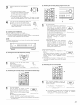
[1] Playing one source while recording another (REC OUT mode)
Press the REC/M_ZONE 2 button until
"RECOUT _$$_" appears on the set's
display
REC /
M ZONE 2
(Mail unt)
Select the source you want to record FUNCTION
appears on the set's disp,ay _O_
• The indicator for the selected
program source lights
(Mail unt)
Set the recording mode.
• For operating instructions, refer to the manual of the
component on which you want to record
To cancel, press the REC/M_ZONE 2 button twice. Then
select "M-ZONE2 SOURCE".
m
O
o
L_J L_J
1,2 1,4 2,4
Display 2
:,,,,:,,, : :::: : ,,,, :::::,,,,: :
U.. L.., =..., =..._ =..._ _ ...._ =..._ =..._ U.. =..., _....
NOTES:
• Recording sources other than digital inputs selected Hqthe REC
OUT mode are also output to the multi source audio/video
output jacks
• Digital signals are not output from the MULTI ZONE 1 audio
output jacks
REC / FUNCTION
{Main ulJt)
[2] Recording Dolby Digital and DTS multichannel sources
• With this set it is possible to record Dolby Digital and DTS
multichannel signals converted into 2-channel analog signals
• The recording signals are output to the MULTi ZONE-2 OUT,
TAPE and VCR output terminals.
• Down=mixed analog signals converted into digital signals are
output from the OPTICAL 5 and 6 digital output terminals at this
time
1
Press the REC/M=ZONE 2 button until "RECOUT _--_---1:$"
appears on the display Then select "RECOUT SOURCE".
REC / FUNCTION
{Main ulJt)
Set the input mode according to the _NPtJT
source to be played MODE
(Mail unt)
Set the surround mode by pressing the DIRECT or STEREO
button.
• The multichannel digital signals are down=mixed and output
to the TAPE and VCR output terminals
DIRECT STEREO
\
(Mail unt) (Remote coflt/ol ul/Jt)
m
0 ..........
°F "S
L_J L_J
323 1 1
AvAMF-ce_o
8URROU idD 21_
3
3
Set the recording mode.
42