
Operating instructions
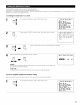




Select the play mode.
Example: Stereo
STEREO
(Mainu/Jr) (Remotecontrolunit}
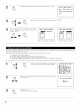
Start playback on the selected component.
• For operating instructions, refer to the component's
manual.
Adjust the volume.
Tie volulne leve is displayed {Main u/it)
o_/the maste_ volume ]evel
display¸
Figures of 05 dB and below
are _ou_/ded down¸
The volume can be adjusted within the range of -80 to 0 to 18 dB,
in steps of 05 dB However, when the channel level is set as
described on page 24 or page 48, if the volume for any channel is
set at +1 dB or greater, the volume cannot be adjusted up to 18
dB. (In this case the maximum volume adjustment range is "18 dB
-- (Maximum value of channel level)".)
Input mode when playing DTS sources
• Noise will be output if DTS-compatible CDs or LDs are played in the
"ANALOG" or "PCM" mode
When playing DTS-compatible sources, be sure to connect the
source component to the digital input jacks (OPTICAL/COAXIAL)
and set the input mode to "AUTO" or "DTS"
NOTE:
• The digital input indicator will light (green) when playing CD-
ROMs containing data other than audio signals, but no sound
will be heard
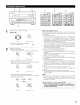
Input mode display
• In the AUTO mode
O O O O
One of these lights, dependi/g oil the
input signal
• In the PCM mode
-- INPUT MODE --
AUTO PCM DTS RF
O O O O
• In the DTS mode
-- INPUT MODE --
AUTO PCM DTS RF
0 0 0 0
• When switched to RF in the VDP RF or AUTO mode
-- INPUT MODE --
AUTO PCM DTS RF
0 0 0 0
• In the ANALOG mode
-- INPUT MODE --
AUTO PCM DTS RF
0 0 0 0
Input signal display
• DOLBY DIGITAL
0 0 O
• DTS
--_NPUTSI_IGNAL--
LOCK DIGITAL
O O O
• PCM
--INPUTSIGNAL--
LOCK DIGITAL _ AL24
O O O O
One of these ights, dependi/g oil the
input signal
[FN PRO LOGIC]
The AL24 indicator lights when the PURE DIRECT, DIRECT or
STEREO mode is selected in the digital input mode
The LOCK LED lights when digital signals are being input properly.
If the LED does not light, check whether the digital input
component setup (page 29) and connections are correct and
whether the component's power is turned on.
[1] Adjusting the sound quality (tone)
The tone control function will not work in the Direct or Home THX Cinema mode.
1
Press the MODE SELECT button and select
TONE.
The mode switches as follows each time
the MODE SELECT button is pressed:
SURR
_" PARAMETER
(* TUNERPRESETI
Only displayed when the TUNER input is
selected.
Select BASS/TREBLE with the
FUNCTION knob.
MODE
SELECT
(Main unit/
FUNCTION
(Mail unt)
m
o L:::I
0 ..........
1
4 1 2 3
4O