
Operating instructions




1
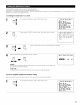
Select "Digital Multi Ch In" on the System Setup
Menu screen, then press jog stick "ENTER"
System Setup Menu
Audio Delay
Multi Zone Control
Auto Surround Mode
Ext. In Setup
7Digital Multi Ch In
On Screen Display
Auto Tuner Presets
Setup Lock
2
To set, select "Yes" and press jog stick "ENTER"
.I-,
Digital Multi Ch In
Extra Digital In
Settlng.
Digital Multi Ch In
_DENON Link <[_
Digital Ext. In 4[_
DENON Link setting :
Set this when connecting a Denon DVD player using the Denon Link terminal
Set to "ON" if you want to use the terminal, "OFF" if you do not want to use it
Select "DENON Link" (using the up and down cursor
buttons) then select ON or OFF (using the left and
right jog stick)
Digital Multi Ch In
_DENON Link 4[_
No Digital 4ANALOG_
SiKnal
Digital Ext, In 4[_
S. Back 4NOT USED_
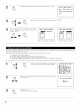
When set to "ON", also set the playback input when there is no digital signal
ANALOG: The analog input of the input source assigned to Denon Link is played
EXT-I: The EXT.IN-1 input is played
EXT-2: The EXT.IN-2 input is played
NOTE:
• When playing using the DENON LINK terminal, also connect the analog external input terminal (EXq-1) (see page 12) and set the "No
Digital Signal" setting to "EX%l ".
Digital Ext. In setting :
This is set for the Digital Ext. In input using the Coaxial 1 to 4 inputs
Select "Digital Ext In" (using the up and down cursor buttons) then select
ON or OFF (using the left and right jog stick)
When set to "ON", the four terminals (Coaxial 1 to 4) are assigned to the
desired input source as a single digital multichannel input.
When set to "OFF" the four terminals (Coaxial 1 to 4) are assigned to
individual input sources.
Digital Multi Ch In
DENON Link 4[_
No Digital <ANALOG_
Slznal
7Digital Ext. In 4[_
S. Dack tNOT USED_
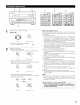
When "ON" was selected at "Digital Ext. In", set the surround back channel input.
If you do not want to use the surround back channel ........... NOT USED
If you do want to use the surround back channel, set according to the specifications of the connected player.
4
Enter the setting
The System Setup Menu reappears.
34