
Operating instructions
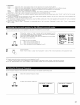






• Input the distance between the listening position and the different speakers to set the delay time for the surround mode
• The delay time can be set separately for surround speakers A and B.
• Two surround back speakers are required to use the THX Ultra2 Cinema and THX Music modes
Set the surround back speakers so that the distance to the listening point is the same for both the left and right speakers
It is also recommended that the deviations of the distance from the listening position to L and R channel speakers (front left (FL) and front right
(FR), surround left (SL) and surround right (SR), surround back left (SBL) and surround back right (SBR)) is less than 2 ft (60 cm).
Preparations:
Measure the distances between the listening position and the speakers (L1 to L6 on the diagram at
the right)
LI: Distance between center speaker and listening position
L2: Distance between front speakers and listening position
L3: Distance between surround speakers and listening position
L4: Distance between surround back speakers and listening position
LS: Distance between subwoofer and listening position
L6: Distance between surround back L and surround back R
FL Center
SBL I
FR
SR
SBR
1
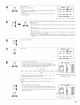
At the System Setup Menu select "Delay Time"
System Setup Menu
Speaker Configuration
7Delay Time
Channel Level
THX Audio Setup
S=tw00ferPeak Limit Lev.
Digital In Assignment
Video Input Mode
Switch to the Delay Time screen
Delay Time
Set The Distance To
Each Speakers
Oa You Prefer
In Meters? / In Feet?
_Meters 4:_ Feet
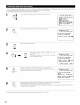
Select the desired unit, meters or feet
Select (darken) the desired units, "Meters" or "Feet". Delay Time
Set The Distance To
Each Speakers
Do You Prefer
In Maters? / In Feet?
_Meters _:_
Example: When "Feet" is selected
Once "Meter" or "Feet" is selected in Step 3, the
Delay ]]me screen appears automatically.
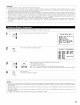
Delay Time
Step 4 lft_
Default _4
FL 412.0ft_
FR 12.0ft
Center 12.0ft
5um0fer 12.0ft
Delay Time
_SL A 410.0ft_
SR A 10.0ft
I_ I SL B 10. Oft
I__ _1 SR B 10.0ft
_ SBL lO. Oft
SBR 10.0ft
Select the speaker to be set.
When "Step" is selected, it is possible to
switch between "1 ft" and "0.1 ft"
23