
Operating instructions


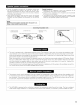


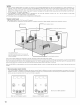


• The composition of the signals output from the different channels and the frequency response are adjusted automatically according to the
combination of speakers actually being used
1
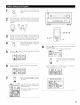
Press "CURSOR/PAGE" at the center of the bottom line on the "AV AMP's" "SE_ING 3/5" page so
that this part is displayed in halftone dot mesh.
Make the system setups by pushing the jog stick on the remote control unit forward and backward, left
and right
2
At the System Setup Menu select "Speaker Configuration"
_E
Switch to the speaker configuration screen
4
Set whether or not speakers are
connected and, if so, their size
parameters
• To selectthe speaker
r
Speaker Configuration
_Front S.
Cent e_p_]
Subwoofer
'Speaker Configuration
_Surround
S_ A _[_]
Sp. B _[_
Sp, Back
• To select the parameter
Center Sp
Front Sp
Subwoofer
Surround Sp A
Sulround back Sp
Sulround Sp B
Enter the setting
a) If no surround speakers are used (if "None" is set for both A and B):
The Crossover Frequency screen appears.
b) If both surround speakers A and B are used (if either "Large" or "Small" is set for both A and B):
The surround speaker setting screen appears
c) When "Front" is set to "Large" and "Subwoofer" is set to "Yes", the set switches to the subwoofer mode
d) If "None" is set for surround speakers A:
"None" is automatically set for surround speakers B and surround back speaker
2O