
Operating instructions


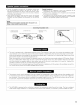




• For details, refer to the separate (supplied) RC-8000 operating instructions
DENON
O Transmitter
Touch panel
CHANNEL up/down buttons
MUTE button
USB terminal
O Jog stick (PUSH ENTER}
VOL (volume) up/down buttons
LIGHT (back light} button
Battery charging contacts
_} RF frequency selector switch
_ Reset button
_! Battery cover
[] SETTING UP THE SYSTEM
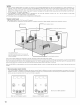
• Once all connections with other AV components have been completed as described in "CONNECTIONS" (see pages 6 to 14), make the
various settings described below on the monitor screen using the AVR-SB03's on-screen display function
These settings are required to set up the listening room's AV system centered around the AVR_5803.
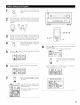
• Use the following buttons to set up the system:
AVAMp'DENO_
UNCTION 115
Screen while icons are displayed
_UNCTIO.1/S D
C23[23
E3E3
AVNd p- D ERi_
SURROUND2/S
^V_Mp-uENue
8eTTIN_ S_S
M-ZONE2 515
T_ansmission codes
of independent buttons
"O
CHANNELA : Tdner preset
CHANNELT : Tdner preset
VOLA : Main volume of AV amplifier
VOLT : Main volume of AV amplifier
MUTE : Muting of AV amplifier
16