
Operating instructions


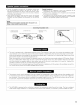




• These jacks are for inputting multi-channel audio signals from an outboard decoder, or a component with a different type of multi-channel
decoder, such as a DVD Audio player, or a multi-channel SACD player, or other future multPchannel sound format decoder
• When making connections, also refer to the operating instructions of the other components
Decoder with 8- or 6-
channel anaEog output
i
I-
W3'="k_ _-@_@@@@@@@@@@@
N_Jl%
............ "d /'i]..... ;'
_@@@@@@_@@@
=!
"_ For instructions on playback using the external input (EXT IN) iacks, see page 44
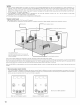
• If another pre-main (integrated) amplifier is connected, the muki-zone jacks can be used to play a different program source in another room at
the same time. (See pages 46, 47)
RC4316
g®®e®®@e6 @@
@@@@@@@@@
5®®6 .....
[]
t._Duii=t._2
€ @
ii>iiiiii iiii>i_i i
.i r+ i,,<
=';<+='==,.,iiil
!? .......E=[3
@® ........
TRIGGEROUT
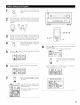
Extenson jacks for _utu_ use_jacksfor future use I P_?_V_t_urOnsU_n and °ff when the product's power istumid onExte_si°n and off
CONTROLterminal
Perform the following operation before using an external contro/er connected to the RS-232Cterminal:
1 Pressthe ON/STANDBYbutton on the main unit and set the unit to the operating mode
2 Per;ormthe operation to turn off the power from the external control
3 Check that the product has been set to the standby mode
After checking the above, check the connections of the external controller Operation is possible
"_ For instructions on operations using the MULTI ZONE jacks, see page 43.
12