
Desktop Computer Quick Reference Guide


38 Troubleshooting
Solving Problems
Troubleshooting Software and Hardware Problems
If a device is either not detected during the operating system setup or is
detected but incorrectly configured, you can use the Hardware
Troubleshooter to resolve the incompatibility.
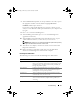
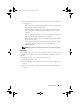
Windows XP:
1
Click
Start
and
click
Help and Support
.
2
Ty p e
hardware troubleshooter
in the
Search
field and click the
arrow to start the search.
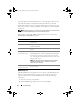
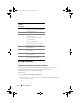
Code
(repetitive
short beeps)
Description
1 BIOS ROM checksum in progress or
failure. Possible motherboard failure.
2 No memory detected.
3 Possible motherboard failure.
• Chipset error
• Time-of-day clock test failure
• Gate A20 failure
• Super I/O chip failure
• Keyboard controller test failure
4 RAM Read/Write failure. Possible
memory failure.
5 RTC power failure. Possible CMOS
battery failure.
6 Video BIOS test failure. Possible
video card failure.
7 CPU Cache test failure (Intel CPU
only). Possible CPU failure.
book.book Page 38 Monday, November 10, 2008 1:26 PM