
User's Manual


Table Of Contents
- About This Document
- Dell Systems Build and Update Utility Overview
- Before You Begin Using the Systems Build and Update Utility
- Launching the Systems Build and Update Utility
- Using the Systems Build and Update Utility
- Flexibility That the Systems Build and Update Utility Offers
- Using the Systems Build and Update Utility in Different Scenarios
- Updating Your System Firmware
- Configuring Your System Hardware
- Installing the Operating System
- Deploying Your Current ("Bare-Metal") Dell System
- Deploying More Than One System With the Same Configuration
- Deploying More Than One System With Slightly Different Configurations
- Deploying Multiple Systems of Different Models
- Deploying Multiple Systems With the Same Configuration for Different Operating Systems
- Reusing Configuration Files
- Important Information and Frequently Asked Questions
- Glossary
- Index
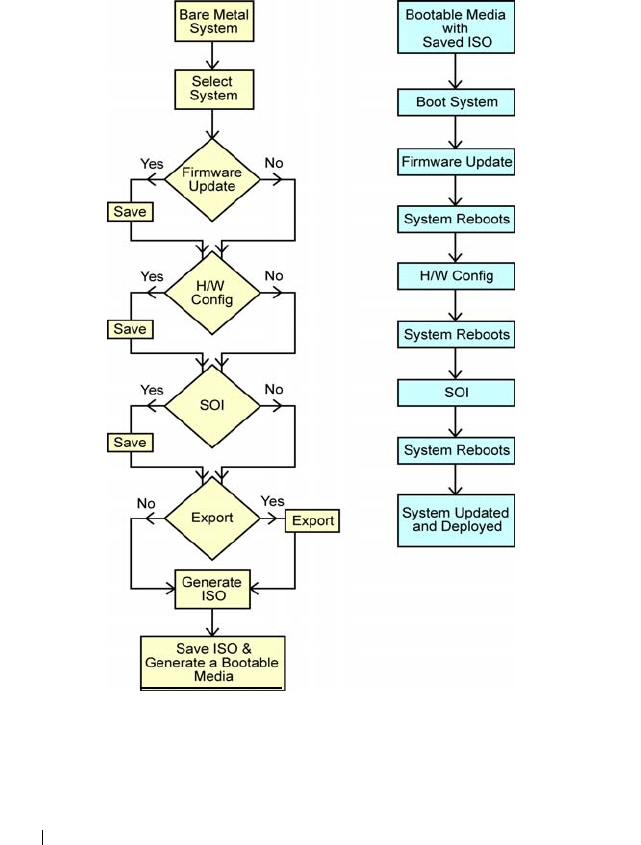
36 Using the Systems Build and Update Utility
Deploying More Than One System With the Same Configuration
In this scenario, you can see how to deploy more than one supported system
with the same configuration (that is, having the same cards, controllers, hard
drive, memory, and so on), for example, 50 Dell PowerEdge™ R710 systems.