
User's Manual


22 Launching the Systems Build and Update Utility
6
To boot the host system to the Systems Build and Update media, select
Power Cycle System
under
Power Control Operations
.
Click
Apply
.
Click
Console
.
7
The
Console Redirection
screen displays.
Click
Connect
.
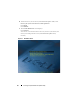
You can now access the boot menu screen on your host system from your
client system and proceed to use Systems Build and Update Utility
remotely.
Figure 4-1. Boot Menu Screen