
Workstation Quick Reference Guide





Quick Reference Guide 37
Diagnostic Light Codes During POST
The power light displays a solid green for diagnostic light codes during POST.
(blinking)
amber A possible power supply
failure has occurred.
Verify that both power supply cables are
plugged in to the motherboard.
Diagnostic Lights Power
Light
Problem Description Suggested Resolution
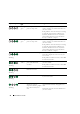
Light Pattern Problem Description Suggested Resolution
A possible processor failure has occurred. Reinstall the processor and restart the
computer.
A possible expansion card failure has
occurred.
1
Determine if a conflict exists by
removing a card (not the graphics
card) and then restarting the
computer.
2
If the problem persists, reinstall the
card that you removed, remove a
different card, and then restart the
computer.
3
Repeat this process for each card. If
the computer starts normally,
troubleshoot the last card removed
from the computer for resource
conflicts (see "Resolving Software and
Hardware Incompatibilities" on
page 29).
4
Move each card one at a time to a
different PCI slot and restart the
computer after each move.
5
If the problem persists, contact Dell
.