
Users Guide
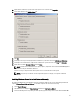
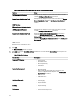
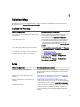
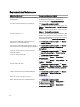
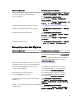
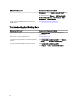
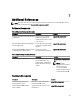
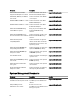

Table 4. List of Windows Server 2008 Roles and Features in the Add Features Wizard
Features Notes
.NET Framework 3.0 Features A dialog box may display the required roles and features for .NET
3.0. Click Add Required Role Services to continue.
Remote Server Administration Tools A dialog box may display the required roles and features for Remote
Server Administration Tools. Click Add Required Role Services to
continue.
SNMP Services
Windows Process Activation Service
.NET Framework 3.5 Features A dialog box may display the required roles and features for .NET
3.5. Click Add Required Role Services to continue.
Remote Server Administration Tools Expand the Remote Server Administration Tools node and then
expand the Role Administration Tools. Select Remote Desktop
Services Tools. A dialog box may display the required roles and
features for Remote Server Administration Tools. Click Add Required
Role Services to continue.
SNMP Services
Windows Process Activation Service
4. Click Next.
The Web Server (IIS) window is displayed.
5. Click Next to display the Select Role Services window and select the following Role Services and sub-options for
Web Server (IIS):
Table 5. List of Role Services
Role Services Sub Options
Common HTTP Features
– Static Content
– Default Document
– Directory Browsing
– HTTP Errors
Application Development
– NET Extensibility
– ASP (A dialog box may display the required roles and
features for Application Development. Click Add Required
Role Services to continue.)
– CGI
– ISAPI Extensions
Health and Diagnostic
– HTTP Logging
– Request Monitor
Security
– Request Filtering
Performance
– Static Content Compression
42