
Reference Guide




Intermediate System to Intermediate System | 465
Change LSP attributes
IS-IS routers flood Link State PDUs (LSPs) to exchange routing information. LSP attributes include the
generation interval, maximum transmission unit (MTU) or size, and the refresh interval. You can modify
the LSP attribute defaults, but it is not necessary.
To change the defaults, use any or all of the following commands in ROUTER ISIS mode:
To view the configuration, use the
show config command in ROUTER ISIS mode or the show
running-config isis
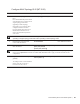
command in EXEC Privilege mode (Figure 475).
Figure 24-6. Command Example: show running-config isis
Configure IS-IS metric style and cost
All IS-IS links or interfaces are associated with a cost that is used in the SPF calculations. The possible
cost varies depending on the metric style supported. If you configure narrow, transition or narrow
transition metric style, the cost can be a number between 0 and 63. If you configure wide or wide transition
metric style, the cost can be a number between 0 and 16,777,215. FTOS supports five different metric
styles: narrow, wide, transition, narrow transition, and wide transition.
Command Syntax Command Mode Purpose
lsp-gen-interval [level-1 | level-2]
seconds
ROUTER ISIS Set interval between LSP generation.
•
seconds range: 0 to 120
Default is 5 seconds.
Default level is Level 1.
lsp-mtu size ROUTER ISIS Set the LSP size.
• size range: 128 to 9195.
Default is 1497.
lsp-refresh-interval seconds
ROUTER ISIS Set the LSP refresh interval.
• seconds range: 1 to 65535.
Default is 900 seconds.
max-lsp-lifetime seconds ROUTER ISIS Set the maximum time LSPs lifetime.
• seconds range: 1 to 65535
Default is 1200 seconds.
FTOS#show running-config isis
!
router isis
lsp-refresh-interval 902
net 47.0005.0001.000C.000A.4321.00
net 51.0005.0001.000C.000A.4321.00
FTOS#