
Reference Guide



Debugging and Diagnostics | 237
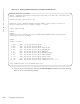
Figure 13-2. Verifying the Offline/Online Status of a S6000 Stack Unit
3. Start diagnostics on the unit using the diag command, as shown in the output example below. When
the tests are complete, the system displays syslog Message 2, and automatically reboots the unit.
Diagnostic results are printed to a file in the flash using the filename format
TestReport-SU-<stack-unit>.txt.
As shown in the following output example, log messages differ somewhat when diagnostics are done on a
standalone unit.
Message 2 Offline Diagnostics Complete
FTOS#00:20:26 : Diagnostic test results are stored on file: flash:/TestReport-SU-0.txt
FTOS#00:20:31: %S6000:0 %DIAGAGT-6-DA_DIAG_DONE: Diags finished on stack unit 0
Diags completed... Rebooting the system now!!!
FTOS#show system brief
Stack MAC : 90:b1:1c:f4:99:cc
Reload-Type : normal-reload [Next boot : normal-reload]
-- Stack Info --
Unit UnitType Status ReqTyp CurTyp Version Ports
------------------------------------------------------------------------------------
0 Management offline S6000 S6000 9.0(2.0) 128
1 Member not present
2 Member not present
3 Member not present
4 Member not present
5 Member not present
-- Power Supplies --
Unit Bay Status Type FanStatus FanSpeed(rpm)
---------------------------------------------------------------------------
0 0 up AC up 10432
0 1 up AC up 10368
-- Fan Status --
Unit Bay TrayStatus Fan0 Speed Fan1 Speed
------------------------------------------------------------------------------------
0 0 up up 10031 up 10134
0 1 up up 10031 up 10031
0 2 up up 10134 up 10031
Speed in RPM