
Reference Guide



236 | Debugging and Diagnostics
www.dell.com | support.dell.com
• When offline diagnostics are complete, the unit or stack member reboots automatically.
• Diagnostics only test connectivity, not the entire data path.
• Diagnostic results are stored on the flash of the unit on which you performed the diagnostics.
• Diagnostic tests run in both non-fanout and fanout mode configuration.
Running Offline Diagnostics
1. Place the unit in the offline state using the offline stack-unit command from EXEC Privilege mode, as
shown in Taking a S6000 Stack Unit Offline. You cannot perform diagnostics on the management or
standby unit in a stacking setup of two or more (Message 1).
Message 1 “%Error: Running Diagnostics on master/standby unit is not allowed on stack”
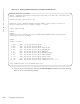
Figure 13-1. Taking a S6000 Stack Unit Offline
2. Use the show system brief command from EXEC Privilege mode to confirm offline status, as shown
in the following example. Results are captured in one file whether for one unit or multiple units.
Note: The system reboots when the off-line diagnostics complete. This is an automatic process in default
mode. A warning message appears when the offline stack-unit command is implemented
Warning - offline of stack unit will bring down all the protocols and the unit will be
operationally down, except for running Diagnostics.
Proceed with Offline-Diags [confirm yes/no]:y
After the system goes offline, you must reload or execute the online stack-unit <id> command for the normal
operation.
FTOS#offline stack-unit 0
Warning - offline of stack unit will bring down all the protocols and
the unit will be operationally down, except for running Diagnostics.
Please make sure that stacking/fanout not configured for Diagnostics execution.
Also reboot/online command is necessary for normal operation after the offline command is issued.
Proceed with Offline [confirm yes/no]:yes
FTOS#00:01:34: %STKUNIT0-M:CP %CHMGR-2-STACKUNIT_DOWN: Stack unit 0 down - stack unit offline
00:01:34: %STKUNIT0-M:CP %IFMGR-1-DEL_PORT: Removed port: Fo 0/
0,4,8,12,16,20,24,28,32,36,40,44,48,52,56,60,64,68,72,76,80,84,88,92,96,100,104,108,112,116,120,
124,