
Reference Guide




362 | FCoE Transit
www.dell.com | support.dell.com
Figure 16-9. show fip-snooping system Command Example
Figure 16-10. show fip-snooping vlan Command Example
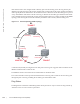
FCoE Transit Configuration Example
Figure 16-11 shows an S5000 switch enabled for FCoE transit and used as a FIP snooping bridge for FCoE
traffic between an ENode (server CNA) and an FCF (ToR switch). The ToR switch operates as an FCF and
FCoE gateway.
Number of FDISC Rejects Number of FIP FDISC reject frames received on the interface.
Number of FLOGO Accepts Number of FIP FLOGO accept frames received on the interface.
Number of FLOGO Rejects Number of FIP FLOGO reject frames received on the interface.
Number of CVLs Number of FIP clear virtual link frames received on the interface.
Number of FCF Discovery
Timeouts
Number of FCF discovery timeouts that occurred on the interface.
Number of VN Port Session
Timeouts
Number of VN port session timeouts that occurred on the interface.
Number of Session failures due
to Hardware Config
Number of session failures due to hardware configuration that occurred on the
interface.
Table 16-5. show fip-snooping statistics Command Descriptions
Field Description
Dell# show fip-snooping system
Global Mode : Enabled
FCOE VLAN List (Operational) : 1, 100
FCFs : 1
Enodes : 2
Sessions : 17
Dell# show fip-snooping vlan
* = Default VLAN
VLAN FC-MAP FCFs Enodes Sessions
---- ------ ---- ------ --------
*1 - - - -
100 0x0EFC00 1 2 17