
Reference Guide




Management | 65
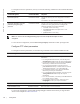
To change one of the settings for logging system messages, use any or all of the following commands in
the CONFIGURATION mode:
To view the logging buffer and configuration, use the
show logging command in the EXEC privilege mode
as shown in the example for Display the Logging Buffer and the Logging Configuration.
To change the severity level of messages logged to a syslog server, use the following command in the
CONFIGURATION mode:
To view the logging configuration, use the
show running-config logging command in the EXEC privilege
mode as shown in the example for Configure a UNIX logging facility level.
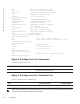
Display the Logging Buffer and the Logging Configuration
Display the current contents of the logging buffer and the logging settings for the system, use the show
logging
command in the EXEC privilege mode as shown in the example below.
FTOS#show logging
syslog logging: enabled
Console logging: level Debugging
Monitor logging: level Debugging
Buffer logging: level Debugging, 40 Messages Logged, Size (40960 bytes)
Trap logging: level Informational
%IRC-6-IRC_COMMUP: Link to peer RPM is up
%RAM-6-RAM_TASK: RPM1 is transitioning to Primary RPM.
%RPM-2-MSG:CP1 %POLLMGR-2-MMC_STATE: External flash disk missing in 'slot0:'
%CHMGR-5-CARDDETECTED: Line card 0 present
%CHMGR-5-CARDDETECTED: Line card 2 present
%CHMGR-5-CARDDETECTED: Line card 4 present
%CHMGR-5-CARDDETECTED: Line card 5 present
Specifying the minimum severity level for logging to a syslog server. logging trap level
CONFIGURATION
Specify the minimum severity level for logging to the syslog history
table.
logging history level
CONFIGURATION
Task Command Syntax Command Mode
Specify the size of the logging buffer.
Note: When you decrease the buffer size, FTOS deletes
all messages stored in the buffer. Increasing the buffer
size does not affect messages in the buffer.
logging buffered size CONFIGURATION
Specify the number of messages that FTOS saves to its
logging history table.
logging history size size
CONFIGURATION
Task Command Syntax Command Mode