
Owner's Manual


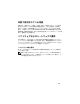

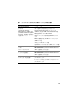
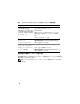
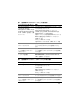

Table Of Contents
- Operating System and Hardware Installation Guide Version 1.0
- Overview of Oracle Database 11g Documentation
- Terminology Used in this Document
- Software and Hardware Requirements
- Installing and Configuring Enterprise Linux
- Before You Begin
- Recommended OS Partitioning Scheme
- Attaching systems to your OS channel
- Updating Your System Packages Using Red Hat Network or Unbreakable Linux Network
- Configuring OS for Oracle Database Installation - About the Dell | Oracle Setup RPM
- Installing the Dell | Oracle RPM Package
- Attaching to the Dell Firmware Repository Channel
- Verifying Cluster Hardware and Software Configurations
- Obtaining and Using Open Source Files
- Getting Help
- 操作系统和硬件安装指南 1.0 版
- Guide d'installation du système d'exploitation et du matériel Version 1.0
- Présentation de la documentation d'Oracle Database 11g
- Terminologie utilisée dans ce document
- Configuration logicielle et matérielle requise
- Installation et configuration du système d'exploitation Enterprise Linux
- Avant de commencer
- Partitionnement recommandé pour le système d'exploitation
- Connexion de systèmes au canal OS
- Mise à jour des modules système à l'aide de Red Hat Network ou d'Unbreakable Linux Network
- Configuration du système d'exploitation pour l'installation d'Oracle Database - À propos du RPM de configuration Dell | Oracle
- Installation du package RPM Dell | Oracle
- Connexion au canal de la logithèque des micrologiciels Dell
- Vérification de la configuration matérielle et logicielle du cluster
- Obtention et utilisation de Open Source
- Obtention d'aide
- Installationshandbuch für Betriebssystem und Hardware Version 1.0
- Übersicht über die Dokumentation zu Oracle Database 11g
- In diesem Dokument verwendete Terminologie
- Software- und Hardwareanforderungen
- Installation und Konfiguration von Enterprise Linux
- Bevor Sie beginnen
- Empfohlenes Partitionierungsschema für das Betriebssystem
- Verbinden von Systemen mit dem Betriebssystemkanal
- Update der Betriebssystempakete über Red Hat Network oder Unbreakable Linux Network
- Betriebssystemkonfiguration für die Oracle-Datenbankinstallation - Dell | Oracle Setup RPM
- Installieren des Dell | Oracle RPM-Pakets
- Verbindung mit dem Dell Firmware-Repository-Kanal
- Überprüfen der Konfiguration von Clusterhardware und -software
- Erwerb und Einsatz von Open-Source-Dateien
- Wie Sie Hilfe bekommen
- OS のインストールとハードウェアの取り付けガイドバージョン 1.0
- Guía de instalación del sistema operativo y el hardware versión 1.0
- Información general sobre la documentación de la base de datos Oracle 11g
- Terminología utilizada en este documento
- Requisitos de software y hardware
- Instalación y configuración de Enterprise Linux
- Antes de comenzar
- Esquema de particiones del sistema operativo recomendado
- Conexión de sistemas al canal de su sistema operativo
- Actualización de los paquetes de sistema mediante Red Hat Network o Unbreakable Linux Network
- Configuración del sistema operativo para la instalación de la base de datos Oracle: Acerca del RPM de configuración de Dell|Oracle
- Instalación del paquete RPM de Dell|Oracle
- Conexión al canal del repositorio de firmware de Dell
- Verificación de las configuraciones de hardware y software del clúster
- Obtención y uso de archivos de código fuente abierto
- Obtención de ayuda
74
ハードウェアの最小要件
以下の項では、ファイバーチャネル、直接接続
SAS
、および
iSCSI
構成に必
要なハードウェア要件を示します。特定のハードウェアコンポーネントの詳
細については、システムに付属のマニュアルを参照してください。
メモ: ユーザー数、使用するアプリケーション、バッチプロセスなどの要因
によっては、必要なパフォーマンスを達成するために、ハードウェアの最小
要件を超えるシステムが必要な場合があります。
ファイバーチャネル構成用のハードウェアの最小要件
ファイバーチャネルクラスタおよびシングルノード構成用のハードウェアの
最小要件を
表
2
~
表
3
に示します。
メモ: クラスタ内のすべてのノードのハードウェア構成は同一でなければな
りません。
表 1. ソフトウェア要件
ソフトウェアコンポーネント 構成
Red Hat または Oracle
Enterprise Linux AS x86-64
(バージョン 5)
アップデート 2
Oracle Database 11g R1
バージョン 11.1.0.7
•
クラスタには、
RAC
オプションを含む
Enterprise/Standard Edition
•
シングルノード構成には、
Enterprise/Standard
および
Standard Edition
EMC
®
PowerPath
®
バージョン 5.1.2
Dell PowerVault? MD3000
Modular Disk Storage
Manager ソフトウェア
バージョン 02.17.G6.26 またはこれ以降
Dell PowerVault
™
MD3000i
Modular Disk Storage
Manager ソフトウェア
バージョン 02.17.G6.26 またはこれ以降