F1697fc0.fm Page 1 Friday, May 23, 2003 10:59 AM Dell™ OptiPlex™ Setup and Quick Reference Guide Model MTC2 w w w. d e l l . c o m | s u p p o r t . d e l l .
F1697fc0.
F1697ebk0.book Page 1 Monday, May 26, 2003 10:26 AM Dell™ OptiPlex™ Setup and Quick Reference Guide Model MTC2 w w w. d e l l . c o m | s u p p o r t . d e l l .
F1697ebk0.book Page 2 Monday, May 26, 2003 11:53 AM Notes, Notices, and Cautions NOTE: A NOTE indicates important information that helps you make better use of your computer. NOTICE: A NOTICE indicates either potential damage to hardware or loss of data and tells you how to avoid the problem. CAUTION: A CAUTION indicates a potential for property damage, personal injury, or death.
F1697ebk0.book Page 3 Monday, May 26, 2003 10:26 AM Contents About This Guide . . . . . . . . . . . . . . . . . . . . . . . . . . . . . . . . . . . . 5 Finding Information for Your Computer . . . . . . . . . . . . . . . . . . . . 5 CAUTION: Safety Instructions . . . . . . . . . . . . . . . . . . . . . . . . . . 8 General . . . . . . . . . . . . . . . . . . . . . . . . . . . . . . . . . . . . . . . . . . . . 8 When Using Your Computer . . . . . . . . . . . . . . . . . . . . . . . . . . .
F1697ebk0.
F1697ebk0.book Page 5 Monday, May 26, 2003 10:26 AM About This Guide This document contains getting started/setup, solving problems, safety, regulatory, and warranty information about your Dell™ OptiPlex™ computer. To obtain the latest versions of the documents on your hard drive, see the Dell Support website at support.dell.com.
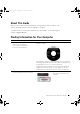
w w w. d e l l . c o m | s u p p o r t . d e l l . c o m F1697ebk0.book Page 6 Monday, May 26, 2003 10:26 AM What Are You Looking For? Find it Here • How to reinstall my operating system Operating System CD The operating system is already installed on your computer. To reinstall your operating system, use the Operating System CD. See your User’s Guide for operating system reinstallation instructions.
F1697ebk0.book Page 7 Monday, May 26, 2003 10:26 AM What Are You Looking For? Find it Here • • • • • • Dell Premier Support Website — premiersupport.dell.
w w w. d e l l . c o m | s u p p o r t . d e l l . c o m F1697ebk0.book Page 8 Monday, May 26, 2003 10:26 AM CAUTION: Safety Instructions Use the following safety guidelines to help ensure your own personal safety and to help protect your computer and working environment from potential damage. General 8 • Do not attempt to service the computer yourself unless you are a trained service technician. Always follow installation instructions closely.
F1697ebk0.book Page 9 Monday, May 26, 2003 10:26 AM CAUTION: Safety Instructions (continued) • To avoid shorting out your computer when disconnecting a network cable, first unplug the cable from the network adapter on the back of your computer, and then from the network jack. When reconnecting a network cable to your computer, first plug the cable into the network jack, and then into the network adapter.
w w w. d e l l . c o m | s u p p o r t . d e l l . c o m F1697ebk0.book Page 10 Monday, May 26, 2003 10:26 AM When Using Your Computer As you use your computer, observe the following safe-handling guidelines. CAUTION: Do not operate your computer with any cover(s) (including computer covers, bezels, filler brackets, front-panel inserts, and so on) removed.
F1697ebk0.book Page 11 Monday, May 26, 2003 10:26 AM When Using Your Computer (continued) When Working Inside Your Computer Before you open the computer cover, perform the following steps in the sequence indicated. CAUTION: Do not attempt to service the computer yourself, except as explained in your online Dell™ documentation or in instructions otherwise provided to you by Dell. Always follow installation and service instructions closely.
w w w. d e l l . c o m | s u p p o r t . d e l l . c o m F1697ebk0.book Page 12 Monday, May 26, 2003 10:26 AM When Using Your Computer (continued) • Handle components and cards with care. Do not touch the components or contacts on a card. Hold a card by its edges or by its metal mounting bracket. Hold a component such as a microprocessor chip by its edges, not by its pins. CAUTION: There is a danger of a new battery exploding if it is incorrectly installed.
F1697ebk0.book Page 13 Monday, May 26, 2003 10:26 AM When Using Your Computer (continued) Battery Disposal Your computer uses a lithium-coin cell battery. The lithium-ion battery is a long-life battery, and it is very possible that you will never need to replace it. However, should you need to replace it, see your User’s Guide. Do not dispose of the battery along with household waste. Contact your local waste disposal agency for the address of the nearest battery deposit site.
w w w. d e l l . c o m | s u p p o r t . d e l l . c o m F1697ebk0.book Page 14 Monday, May 26, 2003 10:26 AM 4 Connect the speakers. 5 Connect power cables to the computer, monitor, and devices and insert the other ends of the power cables to electrical outlets. 6 Verify that the voltage selection switch is set correctly for your location. Your computer has a manual voltage selection switch.
F1697ebk0.
F1697ebk0.book Page 16 Monday, May 26, 2003 10:26 AM w w w. d e l l . c o m | s u p p o r t . d e l l .
F1697ebk0.
F1697ebk0.book Page 18 Monday, May 26, 2003 10:26 AM w w w. d e l l . c o m | s u p p o r t . d e l l . c o m Solving Problems Dell provides a number of tools to help you if your system does not perform as expected. For the latest troubleshooting information available for your system, see the Dell Support website at support.dell.com. You can also find descriptions of Dell troubleshooting tools in the section titled "Getting Help" in your online User’s Guide.
F1697ebk0.book Page 19 Monday, May 26, 2003 10:26 AM Using the Drivers and Utilities CD To use the Drivers and Utilities CD (also known as the ResourceCD) while you are running the Windows operating system: NOTE: To access device drivers and user documentation, you must use the Drivers and Utilities CD while you are running Windows. 1 Turn on the computer and allow it to boot to the Windows desktop. 2 Insert the Drivers and Utilities CD into the CD drive.
F1697ebk0.book Page 20 Monday, May 26, 2003 10:26 AM w w w. d e l l . c o m | s u p p o r t . d e l l . c o m Dell Diagnostics When to Use the Dell Diagnostics If you experience a problem with your computer, perform the checks in "Solving Problems" in the User’s Guide and run the Dell Diagnostics before you contact Dell for technical assistance. Running the Dell Diagnostics may help you resolve the problem without contacting Dell.
F1697ebk0.book Page 21 Monday, May 26, 2003 10:26 AM Starting the Dell Diagnostics From the Drivers and Utilities CD 1 Insert the Drivers and Utilities CD into the CD drive. 2 Shut down and restart the computer. When the DELL logo appears, press immediately. If you wait too long and the Windows logo appears, continue to wait until you see the Windows desktop. Then shut down your computer through the Start menu and try again. NOTE: This feature changes the boot sequence for one time only.
F1697ebk0.book Page 22 Monday, May 26, 2003 10:26 AM w w w. d e l l . c o m | s u p p o r t . d e l l . c o m Regulatory Notices Electromagnetic Interference (EMI) is any signal or emission, radiated in free space or conducted along power or signal leads, that endangers the functioning of a radio navigation or other safety service or seriously degrades, obstructs, or repeatedly interrupts a licensed radio communications service.
F1697ebk0.book Page 23 Monday, May 26, 2003 10:26 AM Dell™ OptiPlex™ 冎 欴 机型:MTC2 w w w. d e l l . c o m | s u p p o r t . d e l l .
F1697ebk0.
F1697ebk0.book Page 25 Monday, May 26, 2003 10:26 AM 靬醄� . . . . . . . . . . . . . . . . . . . . . . . . . . . . . . . . . . . . . . . 27 醄�靬 . . . . . . . . . . . . . . . . . . . . . . . . . . . . . . . 27 藈� . . . . . . . . . . . . . . . . . . . . . . . . . . . . . . . . . . . . 30 一般信息 . . . . . . . . . . . . . . . . . . . . . . . . . . . . . . . . . . . . . . . . . . 30 潖醄� . . . . . . . . . . . . . . . . . . . . . . . . . . . . . . . . . . . . . . 32 拆装计算机内部组件时 . . . . . . . . . .
F1697ebk0.
F1697ebk0.book Page 27 Monday, May 26, 2003 10:26 AM 묌銔銔 本说明文件包含有关 Dell™ OptiPlex™ 计算机的使用入门/安装、解决问题、安全说明、 管制通告以及保修信息。 要获取硬盘驱动器上说明文件的最新版本,请访问 Dell 支持 Web 站点 support.dell.
w w w. d e l l . c o m | s u p p o r t . a p . d e l l . c o m / c h i n a F1697ebk0.
F1697ebk0.book Page 29 Monday, May 26, 2003 10:26 AM 뮤醄뎀 醄뎀뎀 • 服务呼叫状态与支持历史记录 Dell Ҭ됔 Web 萈 premiersupport.dell.
w w w. d e l l . c o m | s u p p o r t . a p . d e l l . c o m / c h i n a F1697ebk0.
F1697ebk0.
w w w. d e l l . c o m | s u p p o r t . a p . d e l l . c o m / c h i n a F1697ebk0.
F1697ebk0.
w w w. d e l l . c o m | s u p p o r t . a p . d e l l . c o m / c h i n a F1697ebk0.
F1697ebk0.
F1697ebk0.book Page 36 Monday, May 26, 2003 10:26 AM w w w. d e l l . c o m | s u p p o r t . a p . d e l l .
F1697ebk0.
F1697ebk0.book Page 38 Monday, May 26, 2003 10:26 AM w w w. d e l l . c o m | s u p p o r t . a p . d e l l .
F1697ebk0.book Page 39 Monday, May 26, 2003 10:26 AM 谘 Dell 提供了多种帮助工具。在系统运行达不到预期的效果时,您可以使用这些工具来 解决问题。有关最新的系统故障排除信息,请访问 Dell 支持 Web 站点 support.dell.
F1697ebk0.book Page 40 Monday, May 26, 2003 10:26 AM w w w. d e l l . c o m | s u p p o r t . a p . d e l l .
F1697ebk0.
F1697ebk0.book Page 42 Monday, May 26, 2003 10:26 AM w w w. d e l l . c o m | s u p p o r t . a p . d e l l .
F1697ebk0.
w w w. d e l l . c o m | s u p p o r t . a p . d e l l . c o m / c h i n a F1697ebk0.
F1697tbk0.book Page 45 Monday, May 26, 2003 9:55 AM Dell™ OptiPlex™ 安裝和快速參考指南 型號 MTC2 w w w. d e l l . c o m | s u p p o r t . d e l l .
F1697tbk0.
F1697tbk0.book Page 47 Monday, May 26, 2003 9:55 AM 目錄 關於本指南 . . . . . . . . . . . . . . . . . . . . . . . . . . . . . . . . . . . . . . . 49 尋找關於電腦的資訊 . . . . . . . . . . . . . . . . . . . . . . . . . . . . . . . . . 49 注意:安全說明 . . . . . . . . . . . . . . . . . . . . . . . . . . . . . . . . . . . . 52 一般規定 . . . . . . . . . . . . . . . . . . . . . . . . . . . . . . . . . . . . . . . . . . 52 使用您的電腦時 . . . . . . . . . . . . . . . . . . . . . . . . . . . . . . . . . . . . 54 進行主機內部組裝時 . . . . . . . . . . .
F1697tbk0.
F1697tbk0.book Page 49 Monday, May 26, 2003 9:55 AM 關於本指南 本文件包含關於 Dell™ OptiPlex™ 電腦的開始使用/安裝、解決問題、安全、管制和 保固資訊。 若要獲得硬碟上的文件之最新版本,請瀏覽 Dell 支援網站 (support.dell.
w w w. d e l l . c o m | s u p p o r t . a p . d e l l . c o m F1697tbk0.
F1697tbk0.book Page 51 Monday, May 26, 2003 9:55 AM 要尋找的項目是? 所在位置 • 服務呼叫狀態和支援歷程記錄 Dell Premier Support (Dell 優先支援) 網站 — premiersupport.dell.
w w w. d e l l . c o m | s u p p o r t . a p . d e l l . c o m F1697tbk0.
F1697tbk0.
w w w. d e l l . c o m | s u p p o r t . a p . d e l l . c o m F1697tbk0.
F1697tbk0.
w w w. d e l l . c o m | s u p p o r t . a p . d e l l . c o m F1697tbk0.
F1697tbk0.
F1697tbk0.book Page 58 Monday, May 26, 2003 9:55 AM w w w. d e l l . c o m | s u p p o r t . a p . d e l l .
F1697tbk0.
F1697tbk0.book Page 60 Monday, May 26, 2003 9:55 AM w w w. d e l l . c o m | s u p p o r t . a p . d e l l .
F1697tbk0.book Page 61 Monday, May 26, 2003 9:55 AM 解決問題 如果系統無法正常執行,Dell 會提供許多工具協助您進行。若要獲得適用系統之最新 故障排除資訊,請瀏覽 Dell 支援網站 (support.dell.
F1697tbk0.book Page 62 Monday, May 26, 2003 9:55 AM w w w. d e l l . c o m | s u p p o r t . a p . d e l l .
F1697tbk0.
F1697tbk0.book Page 64 Monday, May 26, 2003 9:55 AM w w w. d e l l . c o m | s u p p o r t . a p . d e l l .
F1697tbk0.
w w w. d e l l . c o m | s u p p o r t . a p . d e l l . c o m F1697tbk0.
F1697cc0.
F1697cc0.fm Page 2 Friday, May 23, 2003 10:52 AM Printed in China Printed on recycled paper 0F1697A00 w w w. d e l l . c o m | s u p p o r t . d e l l .