
Users Guide




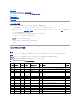

表 12-13ActiveDirectoryサービスの設定パラメータ
IT Assistant を実行しているシステムでの Active Directory の設定
デフォルトでは、Active Directory 製品名は マシン名-ita で、マシン名 は ITAssistantがインストールされているシステムの名前です。違う名前に設定するには、インストールディレクトリにある
itaoem.ini ファイルを使用します。このファイルを編集して "adproductname=テキスト" の行を追加します。ここで、テキストは、Active Directory で作成した製品オブジェクトの名前です。たと
えば、Active Directory 製品名が mgmtStationITA と設定されている場合、itaoem.ini ファイルには次の構文が含まれます。
productname=IT Assistant
startmenu=Dell OpenManage アプリケーション
autdbid=ita
accessmask=3
startlink=ITAUIServlet
adsupport=true
adproductname=mgmtStationITA
目次ページに戻る
「名前=値」のペア
説明
prodname=<テキスト>
Active Directory の設定変更を適用するソフトウェア製品を指定します。Prodname は、omprv32.ini で定義した製品の名前を指します。Server
Administrator の場合、これは omsa です。
enable=<true | false>
true:Active Directory サービスの認証サポートを有効にします。
false: Active Directory サービスの認証サポートを無効にします。
adprodname=<テキスト
>
Active Directory サービスで定義されている製品の名前を指定します。この名前は、ユーザー認証のために製品を Active Directory の権限データに関連付けま
す。
メモ: itaoem.ini ファイルをディスクに保存してから IT Assistant サービスを再起動してください。