
Users Guide





198 Frequently Asked Questions
In this case, NAME is a feature name, for example omacore. X.Y.Z-N is the
version and build number of the feature. Some possible solutions to rectify
this problem:
1
Attempt to uninstall again. For example, use the following command:
rpm -e srvadmin-NAME-X.Y.Z-N.i386
2
Delete the "upgrade.relocation=bad" line if present in the
/etc/omreg.cfg
file and attempt to uninstall again.
Why am I getting a warning concerning the RPM package key during
installation?
The RPM files are signed with a digital signature. To avoid this warning, you
should mount the CD or package, and import the key using a command such
as the following:
rpm --import
/mnt/dvdrom/SYSMGMT/srvadmin/linux/RPM-GPG-KEY
Why is the Prerequisite Checker not available under Red Hat Enterprise
Linux and SUSE Linux Enterprise Server?
The Prerequisite Checker is built into the omilcore RPM package. The checker
uses a combination of RPM dependency checks and Dell hardware checks.
What are the names of all the Dell OpenManage features under Red Hat
Enterprise Linux or SUSE Linux Enterprise Server?
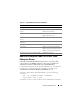
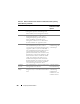
The following table lists the names of all Dell OpenManage features and their
corresponding init script names under Red Hat Enterprise Linux and SUSE
Linux Enterprise Server operating systems:
Table 14-2. Dell OpenManage Features Under Red Hat Enterprise Linux
and SUSE Linux Enterprise Server
Feature Name in VMware ESX, Red Hat Enterprise
Linux, and SUSE Linux Enterprise Server
Managed System Services Feature Feature init Script Name
DSM SA Device Drivers
DSM SA Data Engine Service
instsvcdrv
dataeng
DSM SA Shared Service
DSM SA Connection Service
dsm_om_shrsvc
dsm_om_connsvc