
Users Guide





194 Frequently Asked Questions
After unattended installation is completed, can I use the same console
window to execute CLI commands?
No. A new console window must be opened and CLI commands executed
from that window after an "Unattended Installation" has completed.
Is the time shown during installation/uninstallation by Windows Installer
Services is accurate?
No. During installation/uninstallation, the Windows Installer Service may
display the time remaining for the current task to complete. This is only an
approximation by the Windows Installer Engine based on varying factors.
Can I launch my installation without running the Prerequisite Checker?
How do I do that?
Yes, you can. For example, you can run the MSI of the managed system
software, directly from the
SYSMGMT\srvadmin\Windows\SystemsManagement. In general, it is not a
good idea to bypass the prerequisite information as there could be important
information that you would not know otherwise.
How do I know what version of systems management software is installed on
the system?
Go to Start
→
Settings
→
Control Panel
→
Add/Remove programs and select
Dell OpenManage Server Administrator. Select the link for support
information.
Do I need to reboot the system after upgrading the Dell OpenManage?
Upgrade may require a reboot if the files to be upgraded are in use. This is a
typical Windows installer behavior. It is recommended that you reboot the
system when prompted.
Where can I see the Server Administrator features that are currently
installed on my system?
See Windows Add/Remove Programs to find out what Server Administrator features are
currently installed.
What are the names of all the Dell OpenManage features under Windows?
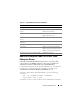
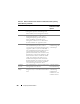
The following table lists the names of all Dell OpenManage features and their
corresponding names in Windows.