
Users Guide




Using Microsoft Active Directory 171
The LDIF script files and the Dell Schema Extender are located in the
following directories on your Dell Systems Management Tools and
Documentation DVD:
• <DVD drive>:\SYSMGMT\ManagementStation\support\OMActiveDirectory_Tools\
<installation type>\LDIF Files
• <DVD drive>:\SYSMGMT\ManagementStation\support\OMActiveDirectory_ Tools\
<installation type>\Schema Extender
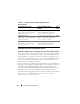
Table 12-1 list the folder names and <installation type>.
To use the LDIF files, see the instructions in the readme that is in the LDIF
files directory. To use the Dell Schema Extender to extend the Active
Directory Schema, perform the steps in "Using the Dell Schema Extender."
You can copy and run the Schema Extender or LDIF files from any location.
Using the Dell Schema Extender
CAUTION: The Dell Schema Extender uses the SchemaExtenderOem.ini file. To
ensure that the Dell Schema Extender utility functions properly, do not modify the
name or the contents of this file.
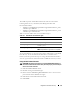
1
Click
Next on the Welcome screen.
2
Read the warning and click
Next
again.
3
Either select
Use Current Log In Credentials
or enter a user name and
password with schema administrator rights.
4
Click
Next
to run the Dell Schema Extender.
5
Click
Finish
.
Table 12-1. Folder Names and Installation Types
Folder Name Installation Type
ITA7
IT Assistant version 7.0 or later
OMSA Dell OpenManage Server Administrator
Remote_Management RAC 4, RAC 5, CMC, and iDRAC on xx0x
modular systems
Remote_Management_Advanced iDRAC on xx1x systems
NOTE: Only iDRAC6 is supported on xx1x systems.