
Users Guide




Installing Managed System Software on Supported Linux and VMware ESX Server Operating
5
Run the
srvadmin-install.sh
shell script as shown below, which performs a
silent and unattended express installation, the setup program installs
following the managed system software features:
• Server Administrator Web Server
• Server Instrumentation
• Storage Management
• Remote Access Controller
sh srvadmin-install.sh --express
or
sh srvadmin-install.sh -x
Server Administrator services do not start automatically.
6
Start the Server Administrator services after the installation using the
srvadmin-services.sh
script by using the
sh srvadmin-services start
command.
Custom Install
Managed system software provides two custom installation paths. One is
RPM-based, with pre-configured custom directories, and the other is shell
script-based.
Using Pre-configured Custom Directories to perform the Custom
installation
See Table 9-1 for details about using the RPMs to perform a custom
installation using pre-configured custom directories.
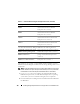
Table 9-1. Custom Installation Using Pre-Configured Directories
Directory Details
To facilitate an RPM-based custom installation, add the RPMs from the following
directories:
SYSMGMT/srvadmin/linux/custom/
ESX35
Contains base Server Administrator with
command line interface for VMware ESX
(version 3.5)
SYSMGMT/srvadmin/linux/custom/
ESX40
Contains base Server Administrator with
command line interface for VMware ESX
(version 4)