
Users Guide

28
|
MCU 固系升级
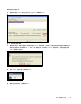
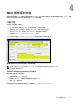
' 5. UPS/PDU Upgrade Software %&
(
%&
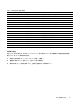
UPS/PDU Firmware File (UPS/PDU
固文)
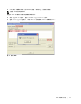
升级设置 生成 rPDU
固版本表。程序参考号和固版本显示在您
所定文的 UPS/PDU Information 。
RS232 or USB 升级设置 RS-232 端口更新 rPDU MCU 固。
NMC 升级设置 H3 MCU 。
Force Upgrade(强升级) 升级设置 H3 MCU 。
Language(7言) 升级设置 更改 rPDU MCU 升级的7言。
4认7言取您计算机所定操系统的7言。
NMC IP Address(NMC IP 地址) 升级设置 H3 MCU 。
SNMP Read Community (SNMP
89社区)
升级设置 H3 MCU 。
User(用户) 升级设置 H3 MCU 。
Password(密码) 升级设置 H3 MCU 。
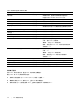
UPS/PDU Information (UPS/PDU 息) rPDU息 提升级开始当相的 rPDU 的唯标数据。
– 提 rPDU 设备。
I
– 指定 MCU 固标码。
7 – 指定当 rPDU MCU 固升级文的版本。
– n/a
File Information (文息) 升级文息 提在升级开始当定固文的唯标数据。
– n/a
I
– 指定 MCU 固标码。
7 – 指定所 MCU 固升级文的版本。
– n/a
+, %&
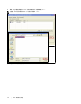
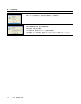
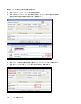
Connect(接) 动按! 定时在 UPS/PDU Information 生成数据。
Upgrade(升级) 动按! 启动 rPDU MCU 固升级。
Close(%) 动按! %实用程序窗口时存更改。
-.
开始 MCU 行升级,检查 rPDU 是否可正确接。
要在 rPDU 和 PC 建行接:
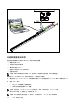
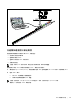
1 找用此接的 RJ-45-to-DB-9 (RS-232) 线缆(已提)。
2 确行线缆 RS-232 接头 PC 的COM 端口相接。
3 将行线缆 RJ-45 接头接 rPDU 的行接端口(参见图 26)。