
Reference Guide
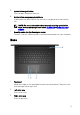

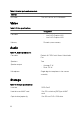
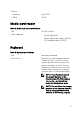
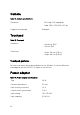
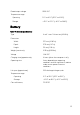

4 Power button
Press to turn on the computer if it is turned o, in sleep state, or in hibernate
state.
Press to put the computer in sleep state if it is turned on.
Press and hold for 4 seconds to force shut-down the computer.
NOTE: You can customize the power-button behavior in Power
Options. For more information, see
Me and My Dell
at www.dell.com/
support/manuals.
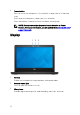
Display
1 Camera
Enables you to video chat, capture photos, and record videos.
2 Camera-status light
Turns on when the camera is in use.
3 Microphone
Provides digital sound input for audio recording, voice calls, and so on.
12