
Reference Guide

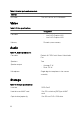
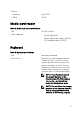
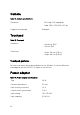
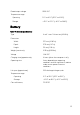

5 Optical-drive eject button
Press to open the optical drive tray.
6 Optical-drive emergency eject pinhole
Used to eject the optical-drive tray manually if the optical-drive eject button
fails.
NOTE: For more information about manually ejecting optical-drive
trays, see the knowledge base article SLN301118 at www.dell.com/
support
7 Security-cable slot (for Kensington locks)
Connect a security cable to prevent unauthorized movement of your computer.
Base
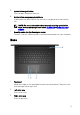
1 Touchpad
Move your nger on the touchpad to move the mouse pointer. Tap to left-click
and two nger tap to right-click.
2 Left-click area
Press to left-click.
3 Right-click area
Press to right-click.
11