
Users Guide

View the dashboard of individually managed servers
on OMM
Ensure to accept all the storage permissions while downloading a SupportAssist report.
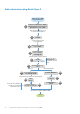
1. View device data by using OMM on page 17.
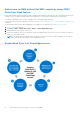
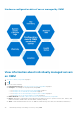
2. You can view the Hardware configuration data of server managed by OMM on page 30 and the following information:
● Firmware Details—View information about the firmware versions of BIOS, CPLD, iDRAC, and Lifecycle Controller
running on the server.
● SupportAssist Collection—Create a SupportAssist report of the storage and debug logs, operating system, and
application data.
● Licenses—View information about licenses of YX4X and later PowerEdge servers added by using network. You can also
view the description, status, license type, and expiration date.
●
To view the Dell Technologies QRL website, tap
, and then tap Support.
To share information using an application available on your phone, tap , and then tap Share.
NOTE: Data on the OMM page is updated every 15 minutes. The Last Poll section displays the number of minutes
before which an OMM page was last updated.
Individually manage PowerEdge servers by using OMM 29