
Users Guide



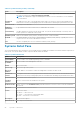


Table 5. Systems Detail Pane (continued)
Field Description
Expiration Date on which the license expires (if applicable).
Term The license term. For more information, see Understanding Licenses.
Date Purchased The date the license was purchased.
Date Imported The date the license was imported.
Discovery/Inventory Wizard
Provide these values to set IP range and host information.
Table 6. Discovery/Inventory Wizard
Field Description
Add Range or IP Click to open the Edit Inventory Range window for adding a new discovery range.
Edit Select an existing range and click to open the Edit Inventory Range window.
Remove
Selected
Click to remove the selected range.
Inventory Click the check box to select the IP address.
Range / Address
Name
Enter a unique name describing the range.
Start / Individual
Address
Enter the beginning range of the IPv4 address or the individual IP address.
End Address Enter the ending range of the IPv4 address.
Subnet Mask
(Optional)
Use subnet mask to exclude network and broadcast addresses from inventory attempts. If omitted, each
address is treated as a host.
Description
(Optional)
Enter a description. Each inventory range can include at most a Class B network (65,536 addresses).
Edit Inventory Range
Table 7. Edit Inventory Range
Field Description
IP Range or Address Name Enter a unique name describing the range.
Enter an IP Range, an Individual Address, or a List of Addresses
IPV4 Range Select to provide an IPv4 address range.
Start Address Enter the beginning range of the IPv4 address or the individual
IP address.
End Address Enter the ending range of the IPv4 address or the individual IP
address.
Subnet Mask Enter the subnet mask for the provided IPv4 address.
Individual IP Address (IPv4, IPv6, or hostname) Select to provide an individual IP address.
Text file with IP addresses Select to create an inventory range using a text file that
includes an IP address or host name in each line.
Load Click to browse and select the text file.
Systems — Reference 29